

The right laptop isn’t always the most powerful one. It’s the one that handles your regular tasks without stretching your budget. If you’re searching “buy laptop Ethiopia,” comparing processor names, memory, storage, and listings from different retailers can quickly feel overwhelming. Start by deciding what you need the laptop to do.
You don’t need to be a tech expert to choose well. Match the laptop and its specifications to your studies, work, creative projects, or everyday browsing, then compare listings with a clear checklist. This guide explains the practical differences, how to avoid paying for performance you won’t use, and how to explore global laptop options while shopping from Ethiopia.
We’ll cover laptop types and the specifications that matter most, including processor, memory, storage, screen size, and battery life. You’ll also learn how CommercePal connects shoppers in Ethiopia with products from global retailers and supports local payment methods such as Telebirr, CBE Birr, and eBirr. Use the steps ahead to build a shortlist that fits your workload.
Key Takeaways
- Choose a laptop for your regular workload, not just its most impressive specifications.
- Compare processor, RAM, storage, display, and battery life based on the role each plays in everyday use.
- Use the category comparison to narrow down options for studying, business, daily tasks, or demanding work.
- Before you buy laptop Ethiopia, check the exact configuration, product details, and order information carefully.
- Explore global laptop options through CommercePal, with local payment methods, 24/7 support, and cashback incentives.
Buy a Laptop in Ethiopia: Start With What You Need It For
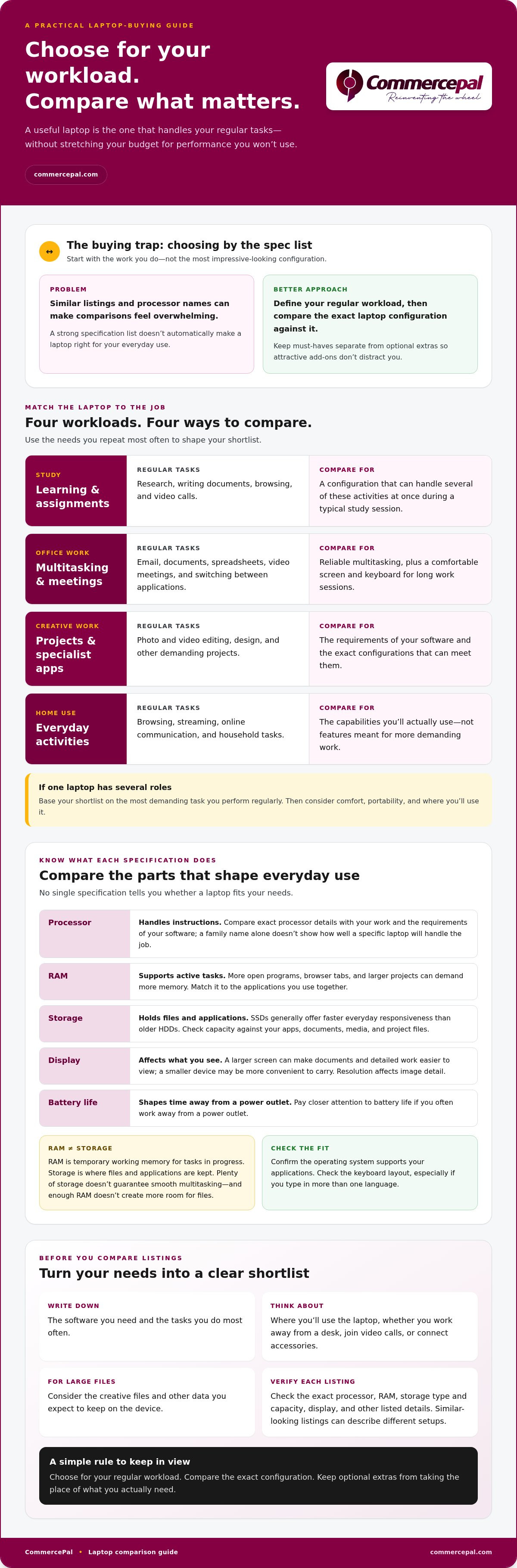
Laptop listings can look similar at first glance, but the right choice depends on what you’ll do with the device each day. A student writing assignments, an office worker switching between documents and calls, and a creative professional handling large projects have different needs. Before you buy laptop Ethiopia shoppers should start with a simple rule: choose for your regular workload, not the most impressive specification list.
Your workload determines which laptop can handle your tasks comfortably and consistently. If you’re new to laptop basics, Wikipedia’s What is a Laptop? provides a general overview of the device and its components.
Which laptop type suits study, work, or home use?
Start with your main use, then consider the tasks you’ll repeat most often:
- Study: Research, writing documents, browsing, and video calls are common student tasks. Look for a configuration that can handle several of these activities at once during a typical study session.
- Office work: Email, documents, spreadsheets, video meetings, and switching between applications call for reliable multitasking. A comfortable screen and keyboard also matter if you use the laptop for long work sessions.
- Creative work: Photo and video editing, design, and other demanding projects can place heavier demands on a laptop than browsing or document editing. Identify the software you use and compare configurations with its requirements.
- Home use: Browsing, streaming, online communication, and household tasks may not need the same capabilities as demanding creative work. Focus on the activities you actually do instead of paying for features you’re unlikely to use.
If you use one laptop for several roles, base your shortlist on the most demanding task you perform regularly. Then consider everyday comfort, portability, and how you’ll use the device.
Set your must-haves before comparing listings
Write down the software you need, your typical tasks, and where you expect to use the laptop. Note whether you often work away from a desk, join video calls, connect accessories, or handle large creative files. These details turn a broad search into a practical checklist.
Separate must-haves from optional extras. Software compatibility and the ability to handle your usual workload belong on the essentials list. Features that would be nice but aren’t necessary can stay optional. This helps keep attractive add-ons from distracting you from the capabilities you need.
Define your use case before opening retailer listings. Once you know whether you need a laptop mainly for study, office tasks, creative work, or home use, you can compare relevant options more consistently.
Laptop Specifications Explained: Choose the Right Performance
Each specification affects a different part of the laptop experience. The processor handles instructions, RAM supports active tasks, storage holds files and applications, the display affects what you see, and the battery determines how long you can work away from a power outlet. No single specification tells you whether a laptop is right for your needs.
RAM is temporary working memory for tasks in progress, while storage is where files and applications are kept. A laptop can have plenty of storage but still struggle with several demanding applications open. It can also have enough RAM but too little room for your files.
Processor and RAM: what affects everyday speed?
Processor families include different performance tiers and generations, so a family name alone doesn’t show how well a specific laptop will handle your work. Compare the exact processor details in the listing with the software you plan to use. Check that software’s requirements before choosing a configuration, especially for specialist work.
RAM matters when you keep multiple programs or browser tabs open at once. A lighter routine might involve a document and a few tabs, while larger projects and frequent multitasking can demand more memory. There isn’t one ideal capacity for everyone. Match the configuration to your applications and the way you use them together.
Storage, display, battery, and operating system
Storage type affects how quickly a laptop can access files and start applications. Solid-state drives (SSDs) generally offer faster everyday responsiveness than older hard disk drives (HDDs). Capacity matters too. Account for your applications, documents, media, and any large project files you expect to keep on the device.
Choose a display that suits your tasks and how you’ll carry the laptop. A larger screen can make documents and detailed work easier to view, while a smaller device may be more convenient to transport. Resolution affects image detail. Your battery needs depend on your routine, so pay closer attention to battery life if you often work away from a power outlet.
- Operating system: Check that it supports the applications you need.
- Keyboard layout: Review the keys and language layout shown in the listing, especially if you type in more than one language.
- Configuration: Verify the exact processor, RAM, storage type and capacity, display, and other listed details. Similar-looking listings can describe different setups.
Compare the specifications against your actual software and routine before you buy laptop Ethiopia. To apply this checklist, browse laptop options through CommercePal and compare the listed details with your needs.
Compare Laptop Categories and Listings Before You Buy
Use laptop categories to narrow your search, not to make the final decision. Labels such as “student” or “business” are broad descriptions, and two listings in the same category can have different components. Compare each configuration with the tasks you need it to handle. For budget-focused choices, see the related guide, best budget laptops in Ethiopia.
Laptop categories: match common features to real tasks
Think about how you’ll use the laptop most often. Students and people who carry a laptop frequently may value portability and battery life. Office users who keep several applications open may need a configuration suited to multitasking rather than one designed mainly for basic browsing. For demanding creative or technical work, let the software’s requirements guide your search, not a status label or brand name.
| Category | Typical tasks | Priorities | Trade-offs |
|---|---|---|---|
| Everyday | Browsing, streaming, email, and basic documents | Comfortable daily use and suitable storage | May not suit demanding software or heavy multitasking |
| Student | Research, assignments, online learning, and video calls | Portability, battery needs, and reliable multitasking | A lighter design may involve trade-offs in screen size or features |
| Business | Documents, spreadsheets, meetings, and multiple applications | Consistent multitasking, comfortable input, and a suitable display | May include capabilities beyond a basic home-use workload |
| Higher-performance | Creative, technical, or other software-intensive tasks | Specifications that meet the software’s demands | Can add capability you may not need for lighter everyday tasks |
How to compare two laptop listings fairly
Put the listings side by side and compare the details, not just their category names or headline descriptions. Check the processor, RAM, storage type and capacity, display size and resolution, and operating system. Then review included accessories, such as a charger or other items mentioned in the listing. Don’t assume similar titles mean identical configurations.
Read the full specification details and confirm they describe the exact item you’re considering. If a listing has multiple configuration choices, compare the selected option rather than relying on a general product summary. You can also consider marketplace differences as you assess listings, ensuring you weigh your platform options carefully in the Ethiopian market.
A simple comparison table can help you decide: record each configuration, mark whether it meets your must-haves, and note any trade-offs. This makes it easier for buy laptop Ethiopia shoppers to choose based on their actual needs instead of category labels alone.
How to Buy a Laptop Online in Ethiopia: A Practical Checklist
A checklist helps you move from a shortlist to checkout without overlooking important details. Global listings can differ in configuration, shipping information, and order terms, so review the full listing and checkout details before placing an order.
- Define your needs. Note your main tasks and essential software. Use them to decide which configurations are relevant.
- Choose a suitable configuration. Compare the processor, RAM, storage, display, and operating system with your workload and software requirements.
- Read the full product listing. Check that the details apply to the exact item or configuration you’re considering. Similar product names don’t always mean identical specifications.
- Check the keyboard and included items. Review the keyboard layout, charger, accessories, and any other contents stated in the listing.
- Review delivery and import information. Cross-border orders may involve shipping arrangements and import considerations. Read the information shown for your order, including any applicable charges or instructions, rather than assuming they’re the same for every listing.
- Choose a payment method. CommercePal supports local payment methods including Telebirr, CBE Birr, and eBirr. Review the payment options presented at checkout.
- Check the final order details. Before completing checkout, confirm the selected configuration, item details, delivery information, payment method, and order summary. Keep your order information for follow-up.
Check the product details and order information
Compare the selected configuration with the listing description, not just the product title or main image. Confirm the operating system, keyboard layout, included accessories, and other specifications in both the item selection and order summary. Read the shipping and import information displayed at checkout so you understand the terms shown for that order.
Plan payment and follow-up
After checkout, use your order information to follow the purchase through the available order updates. Delivery progress and import handling can vary, so don’t assume a specific timeline or customs outcome. For marketplace-specific questions, consult the AliExpress Ethiopia shopping and payment guide.
Use your checklist as you compare options on CommercePal, with local payment methods including Telebirr, CBE Birr, and eBirr.
Buy a Laptop Through CommercePal: Global Choice, Local Payment
Browsing laptop listings from global retailers and marketplaces can expand your options, but the best choice still comes down to the details. CommercePal helps shoppers in Ethiopia access products from these sources, including laptops and computers. Use the workload-first approach from this guide: start with your everyday tasks, then compare each configuration with what you need it to do.
A listing’s category or headline doesn’t tell you whether it suits your studies, office routine, home use, or demanding software. Read the product information closely and compare the exact specifications and order details before deciding. A clear shortlist helps you focus on relevant options across global marketplaces instead of getting distracted by features you won’t use.
A simpler way to access global laptop options
CommercePal gives Ethiopian shoppers access to international merchandise through global retailers and marketplaces. As you browse, apply the same checks to each laptop listing: does the configuration suit your workload, and do the listed details match your must-haves? Compare the processor, RAM, storage, display, operating system, keyboard layout, and included items rather than relying on the product title alone.
This approach helps you compare listings on the details that matter. Keep your use case in view, whether you need a device for documents and video calls or software-intensive tasks. Review the product and order information so you can make an informed choice.
Pay locally and take the next step
CommercePal supports local payment methods including Telebirr, CBE Birr, and eBirr. The platform also provides 24/7 support and offers cashback incentives. Review the payment options presented during checkout and the order information before completing your purchase.
Keep a simple record of each configuration and how well it matches your requirements. This makes it easier to weigh options based on the details that matter, not just category labels. If you’re ready to buy laptop Ethiopia shoppers can compare across global choices, browse CommercePal’s laptop and computer category and assess listings against your workload.
Choose Your Laptop With Confidence
The right laptop is the one that fits your regular workload. Start with your everyday tasks, then compare the processor, RAM, storage, display, battery, and operating system with the software you use. Check the exact configuration and order details before checkout, since similar listings can describe different setups.
CommercePal helps shoppers in Ethiopia access laptop options from global marketplaces, with local payments through Telebirr, CBE Birr, and eBirr. You can also access 24/7 support and cashback incentives. Free shipping applies to orders over 5,000 ETB.
Ready to buy laptop Ethiopia shoppers can compare against their needs? Explore laptops and computers on CommercePal and use your shortlist to find options that suit your work, study, or home routine. Compare the specifications with your must-haves to choose with confidence.
Frequently Asked Questions
Where can I buy a laptop online in Ethiopia?
You can buy a laptop online in Ethiopia through CommercePal, an online marketplace that helps shoppers access products from global retailers and marketplaces. Browse laptop and computer listings, then compare the complete configuration with your needs before ordering. CommercePal supports local payment methods, including Telebirr, CBE Birr, and eBirr, so you can shop for international products using familiar payment options.
How do I choose a laptop for university or work?
Start with the tasks you’ll do regularly. For university, consider research, writing, browsing, video calls, and how often you’ll carry the laptop. For work, think about the applications you use and whether you often multitask. Check the software requirements, then compare configurations against them. Portability, display comfort, and battery needs also depend on your daily routine.
What laptop specifications matter most for everyday use?
For everyday use, compare the processor, RAM, storage, display, and battery life. The processor handles tasks, while RAM supports applications currently in use. Storage holds your files and software. An SSD can provide more responsive everyday file access than an older hard disk drive. Consider screen size and battery needs based on where you use the laptop, and check that its operating system supports your applications.
Can I pay for a laptop online in Ethiopia with Telebirr?
Yes, CommercePal supports Telebirr as a local payment method for online shopping. CBE Birr and eBirr are also supported. Payment options are shown during checkout, so review the available methods as you complete your order. Before confirming, check that the selected laptop configuration and order details are correct. This helps you buy laptop Ethiopia shoppers can match to their needs.
Can I buy laptops from international marketplaces through CommercePal?
Yes, CommercePal helps shoppers in Ethiopia access products from global retailers and marketplaces, including laptops and computers. Browse available listings and compare each product’s specifications with your workload. Review the full product description and order details before checkout, since category labels and similar product names don’t guarantee identical configurations. CommercePal also supports local payment methods for online shopping.
What should I check before ordering a laptop online?
Before ordering, confirm the exact processor, RAM, storage, display, and operating system in the selected configuration. Check the keyboard layout and included accessories, too. Read the product listing carefully, then compare it with the item selected and the final order summary. Review the displayed payment, shipping, and applicable import information before checkout, and keep your order details for follow-up after purchase.
Does CommercePal offer free shipping on laptop orders?
CommercePal offers free shipping on orders over 5,000 ETB. Review the shipping information shown for your order before checkout, and check the final order summary for the shipping details associated with your laptop purchase.


