

Found the right item on AliExpress but aren’t sure how to pay with Telebirr? The practical route for how to buy from AliExpress with Telebirr is to browse AliExpress-sourced products through CommercePal and pay using Telebirr.
Seeing prices in Ethiopian birr doesn’t mean you can pay directly with Telebirr at AliExpress checkout. Telebirr is not a standard direct payment option there. CommercePal offers a local shopping route, where you can browse products from AliExpress and pay using a local payment method.
This guide walks you through finding a product, reviewing its listing, placing an order through CommercePal, and paying with Telebirr. You’ll also learn which payment and order details to save, and where to look for order updates.
Key Takeaways
- CommercePal offers a local route to shop for AliExpress-sourced products and pay with Telebirr.
- To buy from AliExpress with Telebirr, find the item through CommercePal, review its listing, and complete checkout.
- Compare CommercePal’s local checkout with direct AliExpress checkout to understand where you’ll pay and find order information.
- Save your payment confirmation and order reference, then use CommercePal’s order information to follow updates.
- Review the product listing and checkout details before paying with Telebirr.
Can You Buy from AliExpress with Telebirr?
Yes. Ethiopian shoppers can use Telebirr to pay for AliExpress-sourced products through CommercePal, a local marketplace that brings products from global retailers into one shopping route. You browse and place your order through CommercePal rather than checking out directly on AliExpress.
CommercePal connects AliExpress-sourced products with a local marketplace checkout where you can pay using Telebirr. AliExpress is the product source, CommercePal is the marketplace where you browse and order, and Telebirr is the payment method.
Using a local payment method gives you an alternative to paying with an international bank card. If you’re learning how to buy from AliExpress with Telebirr, start by understanding which platform handles each part of the purchase.
Does AliExpress accept Telebirr directly?
Telebirr is not a standard direct payment option at AliExpress checkout. This guide focuses on CommercePal as the local route: find an AliExpress-sourced product through its marketplace, then pay with Telebirr at checkout.
Telebirr is a mobile payment service used in Ethiopia. For background on its role and services, see the Telebirr Wikipedia page. Paying through CommercePal is different from paying AliExpress directly, even when the product originates there.
How does CommercePal connect AliExpress shopping with Telebirr?
CommercePal aggregates products from AliExpress alongside products from other global marketplaces. You can browse eligible listings and complete your purchase using local payment methods including Telebirr, CBE Birr, and eBirr.
Think of the journey in three parts:
- Product source: AliExpress is where the product listing originates.
- Marketplace: CommercePal presents AliExpress-sourced products for shoppers in Ethiopia.
- Payment: Pay for your order through CommercePal using Telebirr.
This route lets you browse AliExpress-sourced products and pay using a local method. It also makes clear where to find the listing and where payment takes place. The next step is to follow the shopping route from finding an item to reviewing its details before checkout.
How the AliExpress-to-Telebirr Shopping Route Works
Follow a clear sequence: identify the product you want, find its listing on CommercePal, check the details, and pay with Telebirr. Checkout wording and layout can change, so follow the instructions displayed during your purchase rather than relying on a particular button name.
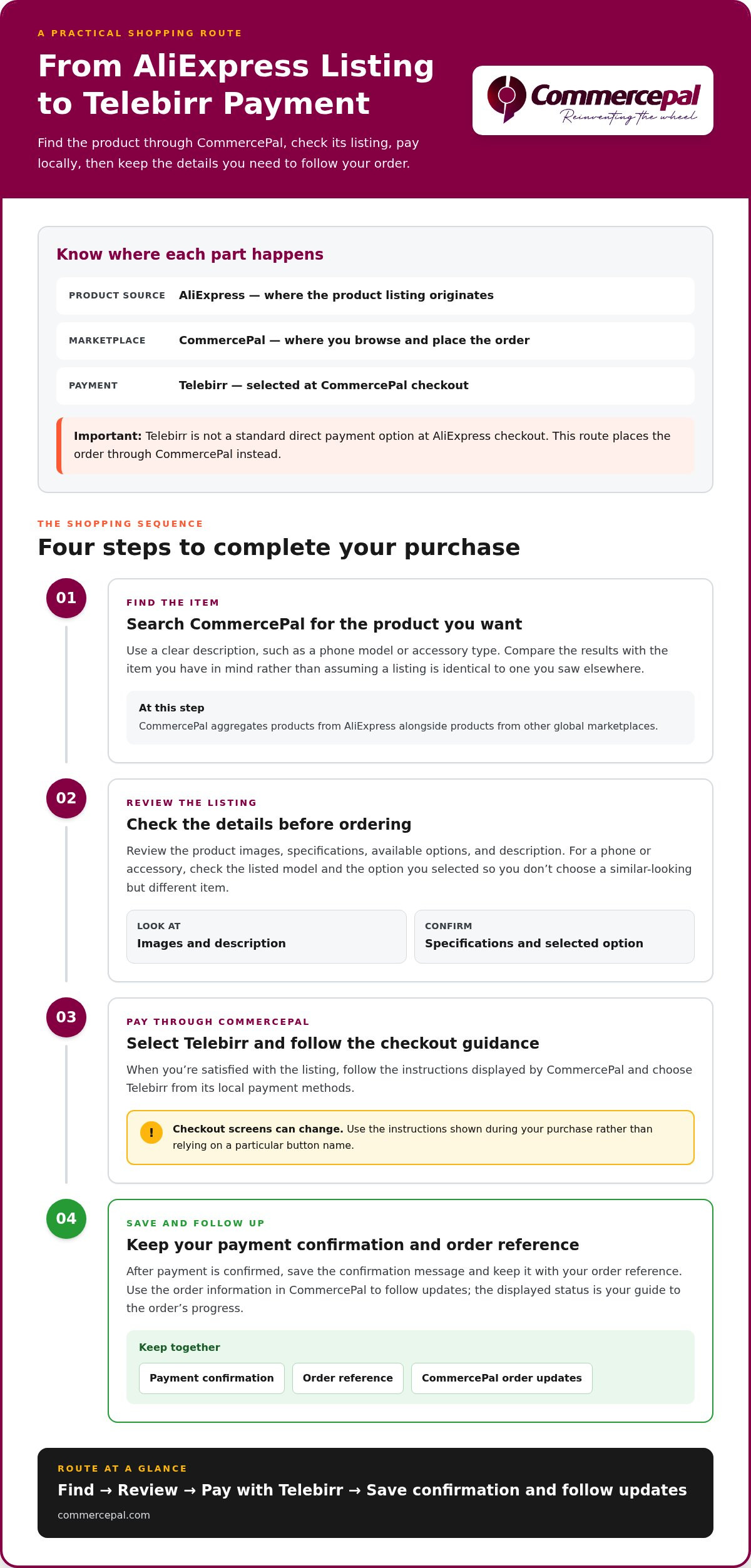
The local purchase flow is straightforward: find the item, review its listing on CommercePal, pay with Telebirr, then save your confirmation for order follow-up.
Find and review the item before ordering
Start with the product you have in mind. Search CommercePal using a clear description, such as a phone model or accessory type, then compare the results with the item you want. CommercePal aggregates products from AliExpress, so check the listing carefully rather than assuming every detail matches a product you saw elsewhere.
Review the product images, specifications, available options, and description before ordering. For a phone or accessory, check details such as the listed model and selected option. This helps you avoid choosing a similar-looking but different item.
Complete checkout with Telebirr
Once you’re satisfied with the listing, follow the checkout instructions displayed by CommercePal. Select Telebirr from the local payment methods and follow the on-screen guidance. The interface may change, so use the instructions shown during checkout.
Payment confirmation is an important checkpoint. Save the confirmation message and keep it with your order reference. These details can help you identify the purchase if you need to review it later. After payment is confirmed, use the order information in CommercePal to follow updates. The displayed status is your guide to the order’s progress.
- Find: Search CommercePal for the AliExpress-sourced product you want.
- Review: Compare its images, specifications, options, and description with your needs.
- Pay: Select Telebirr and follow the checkout instructions.
- Save: Keep your order reference and payment confirmation, then check for updates.
That’s how to buy from AliExpress with Telebirr: CommercePal brings product discovery and local payment into one route, with order updates available after payment confirmation. To start browsing, visit CommercePal’s online marketplace.
CommercePal or Direct AliExpress Checkout: Which Route Fits?
Both routes can help you shop for products from AliExpress, but they handle payment and order information differently. With direct checkout, you place the order on AliExpress and use the payment options displayed there. With CommercePal, you shop through a local marketplace and pay using methods such as Telebirr, CBE Birr, or eBirr.
| What to compare | Direct AliExpress checkout | CommercePal route |
|---|---|---|
| Payment route | Pay through AliExpress using the methods displayed during its checkout. | Place the order through CommercePal and choose from its local payment methods. |
| Local payment access | Depends on the payment options shown for your checkout. | Local methods include Telebirr, CBE Birr, and eBirr. |
| Order management | Refer to the order information provided through AliExpress. | Refer to the order information provided through CommercePal. |
When the CommercePal route may be more convenient
Choose CommercePal if paying with a familiar Ethiopian payment method is a priority. Its marketplace brings products from AliExpress and other global retailers into one locally accessible shopping experience. You can pay with Telebirr, CBE Birr, or eBirr rather than relying on an international card. CommercePal also provides 24/7 support if you need help with an order.
Direct AliExpress checkout may suit you if you prefer to place the order on AliExpress and its displayed payment options work for you. Check the payment methods shown at checkout rather than assuming Telebirr is available directly.
What to check before choosing a checkout route
Compare the product listing and final order information before paying. Confirm that the product, selected options, and description match what you want. Then review the payment method and save your order confirmation. Your chosen route determines where you complete checkout and where you’ll find order information afterward.
- Prefer a local payment method? CommercePal supports Telebirr and other local payment methods.
- Want to check AliExpress’s own payment options? Review the methods displayed during direct checkout.
- Need broader marketplace context? Look for the AliExpress Ethiopia guide alongside this article.
If your main question is how to buy from AliExpress with Telebirr, CommercePal offers a local payment route. Compare the product listing and checkout details, then use the order information from the marketplace where you placed your purchase.
What to Do After Paying with Telebirr
After checkout, keep two records together: your payment confirmation and your order reference. The payment confirmation shows that your Telebirr payment was recorded, while order updates show what’s happening with the purchase. Save both so you can refer to the right details if you need help.
Keep payment and order details together
Save your Telebirr payment confirmation and CommercePal order reference in one place, such as a folder or note on your phone. Then check CommercePal’s order information for available updates. A payment receipt may not show the order’s progress, so look for updates connected to the order itself.
- Save: Keep the order reference and Telebirr payment confirmation.
- Check: Review the order information available through CommercePal for updates.
- Follow up: If you have a question about the order, use CommercePal’s support channel and include your reference details.
If an order update doesn’t appear immediately, allow time for international processing before treating the delay as a payment problem. Payment confirmation and order progress are separate checkpoints, and international purchases aren’t same-day fulfillment. Delivery times vary, so use the updates available for your order rather than assuming a fixed arrival date.
Understand delivery and possible extra steps
International fulfillment involves more steps than local same-day delivery, so an order may take time to progress between updates. Check the delivery information shown for your specific purchase and follow available order updates. Delivery details and any additional steps can vary, so rely on the information provided with the purchase instead of estimating duties or customs requirements.
For broader shopping and delivery context, read the AliExpress Ethiopia guide. It can help explain the wider marketplace journey, while your CommercePal order information is where you can follow this purchase.
Ready to find an AliExpress-sourced item and keep its order details in one local shopping route? Browse products on CommercePal, then save your confirmation after checkout.
Start Your AliExpress Purchase with Telebirr on CommercePal
Put the process into action: find the product you want, review its CommercePal listing, and complete checkout with Telebirr. This route brings AliExpress-sourced products into a local marketplace experience, so you can browse and pay through CommercePal.
A quick pre-checkout checklist
Review your order before paying. A careful final check can help you catch a mismatched option or product detail while you can still adjust your selection.
- Confirm the product: Make sure the listing matches the item you intended to order.
- Review options: Check the selected model, size, or other available choice, along with the product description.
- Check the order details: Read the information shown at checkout before completing payment.
- Select your payment method: Choose Telebirr from CommercePal’s local payment methods.
- Keep your records: Save the order reference and Telebirr payment confirmation together after checkout.
Payment confirmation and order progress are separate updates. Keep the confirmation as proof of payment, then use the order information in CommercePal to follow available updates. If you have a question about your purchase, CommercePal’s 24/7 support is available to help.
Browse global products with local payment options
CommercePal connects products from global marketplaces, including AliExpress, with local payment options for shoppers in Ethiopia. Orders over 5,000 ETB qualify for free shipping. Review the details shown for your order before completing checkout.
If you’ve been researching how to buy from AliExpress with Telebirr, keep the route simple: find the item, review its listing, and complete checkout with Telebirr. Browse products on CommercePal and explore AliExpress-sourced products through a local shopping route.
Make Your Next AliExpress Purchase Locally
Now you know how to buy from AliExpress with Telebirr: find an AliExpress-sourced product through CommercePal, review its listing and order details, then pay with Telebirr. CommercePal also supports local payment methods such as CBE Birr and eBirr, giving you alternatives to an international card.
After paying, save your order reference and payment confirmation, then follow available order updates through CommercePal. Payment confirmation and order progress are separate steps. CommercePal’s 24/7 customer support is available for order questions, and orders over 5,000 ETB qualify for free shipping.
Ready to explore products from AliExpress and other global marketplaces through a local shopping route? Browse global products and pay locally with CommercePal. Choose your item, check the listing carefully, and get started.
Frequently Asked Questions
Can I pay AliExpress directly with Telebirr?
Telebirr is not a standard direct payment option on AliExpress. Direct payment methods can vary by platform and checkout, so review the options shown for your purchase. For a local route, CommercePal offers AliExpress-sourced products through its marketplace and supports Telebirr. After paying, save your payment confirmation and order reference so you can refer to them when checking your order.
How do I buy from AliExpress with Telebirr in Ethiopia?
Find the product through CommercePal, review its listing and order details, then follow the checkout instructions. Select Telebirr and complete the on-screen payment steps. Checkout labels can change, so use the instructions shown at the time rather than relying on a fixed sequence. Save your payment confirmation and order reference, then use the order information available through CommercePal to follow updates.
Is CommercePal an AliExpress store?
CommercePal is an online marketplace that aggregates products from global retailers, including AliExpress. AliExpress is one source of products, while CommercePal provides the local shopping experience for browsing and purchasing them. They are distinct parts of the purchase journey. Before ordering, read the product listing and checkout details so you understand which item you’re selecting and how the order and payment are handled.
What payment methods can I use on CommercePal?
CommercePal supports local Ethiopian payment methods including Telebirr, CBE Birr, and eBirr. Choose your preferred method during checkout and follow the instructions shown on screen. Once the payment is complete, keep its confirmation and your order reference. Use the order information in CommercePal to follow available progress updates.
What should I do if my Telebirr payment goes through but my order is not updated?
Keep your Telebirr payment confirmation and CommercePal order reference, then review the order information for the latest status. Payment confirmation and an order update may not appear at the same moment, so keep both records. If the order still doesn’t reflect your payment, contact CommercePal support and provide both references. These details can help the team locate the transaction. CommercePal support is available 24/7.
How long does AliExpress delivery to Ethiopia take?
Delivery timing varies with the product, international fulfillment, and shipping arrangements, so there isn’t one estimate for every order. Check the delivery information shown for your purchase and follow available order updates. International fulfillment isn’t same-day delivery. If you need an item by a particular date, plan ahead and use the timing information provided with the order rather than relying on a general estimate.
Can I get free shipping when I buy AliExpress products through CommercePal?
CommercePal offers free shipping on orders over 5,000 ETB. Check the order total and shipping information shown before checkout to see whether your purchase meets the threshold. After payment, keep the order confirmation for reference and use the order information available through CommercePal to follow updates.


