

The wrong cable can make a promising phone accessory useless. Before you buy, check that it matches your phone’s model, connector, and everyday needs. If you’re searching “buy phone accessories Ethiopia,” it pays to look beyond the product photo and confirm the listing details before ordering.
Choosing online can feel uncertain: Will the accessory fit your device? Does the description provide enough information to judge it? And what should you check about payment and delivery in Ethiopia? This guide helps you build a practical checklist around how you use your phone, verify compatibility, and review product details before checkout. It also covers the order terms to confirm, including which local payment methods are currently available and how delivery is handled. CommercePal is one route for browsing international phone accessories and completing checkout locally, but listings and terms can change. Check the current details before placing an order. Start with your phone and your needs, then make the purchase decision with fewer unknowns.
Key Takeaways
- Build a shortlist around protection, charging, portable power, audio, and car use, then prioritize what fits your routine.
- Before you buy phone accessories Ethiopia, identify your exact phone model and compare it with the accessory’s stated compatibility details.
- Compare essentials such as materials, specifications, and included items separately from preferences like colour or extra features.
- Review checkout details as well as the product listing, including delivery coverage, estimated timing, fees, and any duties shown.
- Use a simple browse, compare, verify, and checkout process on CommercePal, checking current listings and order options as you go.
Which phone accessories are worth buying in Ethiopia? Start with this checklist
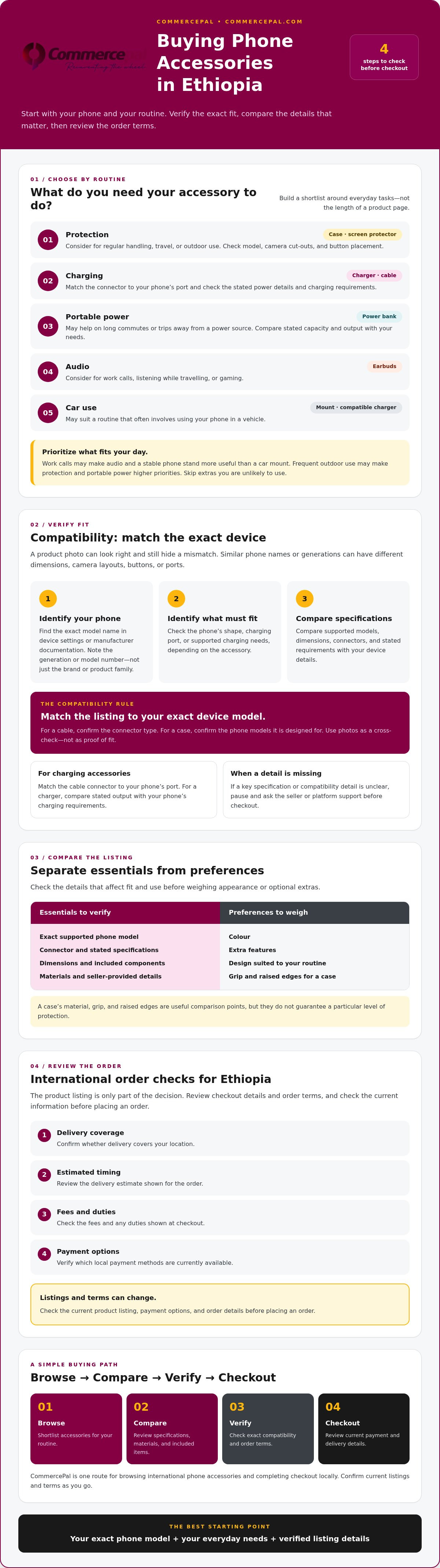
A useful phone accessory is a device-specific add-on that supports protection, power, audio, or another everyday task. Before you buy phone accessories Ethiopia, start with the job you want an accessory to do, then check whether it suits your phone and routine.
- Protection: Consider a case or screen protector if your phone faces regular handling, travel, or outdoor use.
- Charging: Check charger and cable options for your phone’s charging port and your usual charging setup.
- Portable power: A power bank may help on long commutes or trips away from a power source.
- Audio: Consider earbuds if you take work calls, listen while travelling, or play games.
- Car use: A car mount or compatible charging accessory may be useful if you often use your phone in a vehicle.
Choose by routine, not by the size of a listing page. Work calls may make audio and a stable phone stand more useful than a car mount. Frequent outdoor use may make protection and portable power higher priorities. For device context before you shop, see this smartphone buying guide for Ethiopia. Ethiopia’s telecom market has changed over time, as outlined in Telecommunications in Ethiopia; still, confirm accessory compatibility with your specific device rather than assuming a general market trend determines fit.
Protection accessories: cases and screen protectors
A case can help protect a phone from everyday bumps and scratches, while a screen protector may be worth considering if the display is frequently exposed. Neither is a substitute for careful handling. Check the exact phone model and generation in the listing, then compare its camera cut-outs and button placement with your device. Material, grip, and raised edges are useful comparison points, but they don’t guarantee a particular level of protection.
Power, audio, and everyday-use accessories
Start with connections and stated specifications. Match a charger and cable connector to your phone’s charging port, and check the listing for relevant power details instead of relying on a product photo. For a power bank, compare stated capacity and output with how long you’ll be away from a charging point. For earbuds, stands, or car mounts, check that the design suits your routine and phone. Skip extras you’re unlikely to use. A clear match between device, task, and listing is a better starting point than choosing by appearance alone.
How to check phone accessory compatibility before you order
A product photo can look right and still hide a mismatch. Use this quick process before you buy phone accessories Ethiopia:
- Identify your phone. Find the exact model name in your device settings or the manufacturer’s documentation. Note the generation or model number too, not just the brand or product family.
- Identify the accessory. Decide what it must fit or connect to, such as the phone’s shape, charging port, or supported charging needs.
- Verify the specifications. Compare the listing’s supported models, dimensions, connectors, and stated requirements with your device details.
Compatibility rule: Match the accessory listing to your exact device model. Similar phone names or generations can have different dimensions, camera layouts, button positions, or ports. Don’t assume an accessory made for a related model will fit yours.
Check the phone model, port, and charging needs
Start with the full model name shown in settings or manufacturer documentation. Then compare the phone’s charging port with the cable connector shown and described in the listing. For a charger, check its stated output against the phone’s charging requirements. If the listing uses broad wording such as “fits this phone series,” look for the exact model or a clear compatibility list before deciding.
Read listing details and ask before checkout
Review supported models, dimensions, included components, and seller-provided specifications. A cable listing, for example, should make its connector type clear; a case listing should identify which phone models it’s designed for. Use product photographs as a cross-check, not proof. Angles, cut-outs, or connectors may be hard to judge from an image alone.
If a key detail is missing or unclear, pause and ask the seller or platform support before checkout. Keep your question specific: provide your exact phone model and ask whether the listed accessory supports it. Save the listing details you relied on so you can compare them with the item received.
For issues involving telecom services, Ethiopia’s Communications Authority provides information about telecom consumer rights and complaint processes. That resource concerns telecom matters; it doesn’t confirm whether a particular accessory fits your phone. For a practical next step, browse phone accessories on CommercePal and check each current listing against your device details before ordering.
How to compare phone accessories for quality and everyday value
Compare what each listing actually tells you, not just its photos or promotional wording. Clearer specifications make accessory comparisons more reliable. Use this checklist to separate essential fit and function from personal preferences before you buy phone accessories Ethiopia.
| What to compare | Must-have check | Preference to weigh |
|---|---|---|
| Compatibility | Does the listing name your exact phone model or the required connection type? | Colour or shape, if fit is already confirmed |
| Materials | Does the description identify the material? | Texture, finish, or feel, if stated |
| Specifications | Are the relevant dimensions, connector, output, or capacity provided? | Extra features you expect to use |
| Included items | Does the listing say whether a cable, adapter, or other component is included? | Additional pieces that aren’t essential to your setup |
| Listing clarity | Are model support and key details easy to understand? | Photo style or presentation |
Compare specifications rather than product photos alone
For cases and screen protectors, confirm the exact model fit and compare any materials stated in the description. A photo may show a similar-looking phone, but it can’t confirm the dimensions or cut-outs match yours. For charging accessories, check the connector, supported output, and whether the listing includes a cable. For power banks, compare the stated capacity; for audio accessories, check the connection method and whether it works with your intended setup.
Treat words such as “durable,” “premium,” or “fast” as claims to investigate, not proof of quality. Look for supporting specifications or clear product details. Don’t assume a certification, performance level, or guarantee unless it’s explicitly documented and relevant to the item.
Spot missing details before choosing
Pause if a listing leaves out information you need, such as compatibility, dimensions, connector type, or included components. Compare the seller information and review return or dispute terms wherever they’re displayed, including at checkout. A low price or polished image can’t make up for missing essentials.
If two options seem similar, write down your non-negotiables first, then compare preferences such as colour, shape, or extra features. Ask the seller or platform support a specific question if an important detail remains unclear, and review the response before paying. For broader context on online commerce and technology in Ethiopia, see Ethiopia's digital economy landscape. Use the same careful approach across listings: choose the clearest match for your needs, not the one with the boldest claim.
What Ethiopian shoppers should check before ordering accessories internationally
A product listing helps you assess an accessory. Checkout shows the fuller order picture. Before you buy phone accessories Ethiopia, review both: the listing may explain compatibility and included items, while checkout can show whether delivery is available for your destination, the estimated timing, fees, and any applicable duties displayed for the order.
Use this final check before confirming:
- Delivery: Confirm destination coverage and the estimated timing for the specific item. Don’t assume all listings share the same delivery terms.
- Payment: Review the methods available at checkout. Telebirr, CBE Birr, and eBirr are listed as local payment options on CommercePal, but confirm which options are currently available for your order.
- Order terms: Read the displayed return, cancellation, and support information so you know what applies if plans change or an issue arises.
- Additional charges: Check whether duties or other charges are shown. Don’t assume they’re included in the displayed product amount or estimate an amount without order-specific information.
Check payment, delivery, and order terms
Enter the required destination details and inspect the order summary before payment. Compare the checkout information with the product page, and look for any changes to delivery estimates, fees, or available payment methods. If a term is unclear, seek clarification before confirming rather than relying on assumptions based on another item or past order.
For international orders, use the checkout details for your specific purchase as the clearest guide. Delivery coverage, timing, and payment options can vary, so review them again before placing the order.
Understand shipping offers and possible additional charges
CommercePal lists free shipping for qualifying orders above a stated threshold. Verify the current threshold, item eligibility, and checkout terms before treating the offer as applicable. It may not cover every accessory or order. Also review any duties or additional charges displayed for your purchase, and check where and when they apply. If checkout doesn’t make a relevant charge clear, ask for clarification before paying.
Take a moment to compare the final order details with your budget and delivery needs. If they’re clear and the payment option suits you, continue with the checkout steps shown. To review current listings and order details, browse phone accessories on CommercePal.
How to buy phone accessories through CommercePal
Use CommercePal as one route to browse international phone accessories and review local checkout options. Keep the process simple: browse the Smartphones & Accessories category, compare current listings, confirm the accessory matches your exact phone model, then review the order details before paying. Stock, specifications, delivery information, and available payment methods can vary, so use the details shown for the listing and your checkout.
This sequence helps turn “buy phone accessories Ethiopia” from a broad search into a considered order. Choose an accessory that meets your needs, then check that the details hold up before you commit.
Review the listing and complete checkout carefully
Before adding an accessory to your order, confirm the selected item and its stated compatibility with your phone. Recheck the listing if you change a selection or compare a different option. At checkout, review the final order summary, payment method, delivery details, and displayed terms. Make sure the order reflects the item you intended to choose, not just a similar-looking listing.
Once the order is placed, keep the confirmation and any order reference available. These details can help if you need to check an order or ask a question. Don’t rely on an earlier product page for final terms if checkout displays updated information.
Use local support if an order detail is unclear
CommercePal lists Telebirr, CBE Birr, and eBirr among its local payment methods. Availability may depend on current checkout options, so confirm which methods you can use for your order. Check shipping terms there too, including the delivery details and any charges shown. If a listing, payment option, or order term is unclear, contact CommercePal support using the current contact details provided on the platform. Confirm the relevant detail before completing payment.
Take a final pause: does the item match your device, do the checkout terms make sense, and is your preferred payment option available? If so, you’re ready to proceed. Browse phone accessories on CommercePal and use the checklist to guide your next step.
Make your next accessory order with confidence
A good accessory choice starts with a clear purpose, but fit should come first. Identify your exact phone model, match it to the listing’s compatibility details, and compare the specifications and included items before deciding. Then review checkout for the order-specific delivery, payment, and other terms that apply.
If you’re ready to buy phone accessories Ethiopia, CommercePal offers one way to browse international listings and check local checkout options. The platform lists Telebirr, CBE Birr, and eBirr among its payment methods, but confirm what’s available for your order. CommercePal also lists 24/7 support; check the current support channels if you need help with a listing or order detail.
Take the checklist with you, compare carefully, and pause if an essential detail isn’t clear. Browse phone accessories on CommercePal to explore current listings. A few careful checks can make your next choice feel much more straightforward.
Frequently Asked Questions
Which phone accessories should I buy first?
Start with the accessory that solves a regular problem for you. If your phone is exposed to bumps during daily use, consider a case or screen protector. If battery life is a concern away from a power source, compare portable power options. For frequent calls, audio accessories may be more useful. Make a short list based on your routine, then check compatibility before choosing anything.
How can I make sure a phone case fits my exact model?
Check the full phone model name and generation in your device settings or manufacturer documentation, then look for that exact model in the case listing. Don’t rely on a broad brand or phone-family name. Compare the written compatibility details with the camera cut-out and button placement shown in the listing. If the supported model isn’t clear, ask the seller or platform support before ordering.
Can I use any charger or cable with my phone?
No. Match the cable connector to your phone’s charging port, and check a charger’s stated output against the phone’s charging requirements. A connector that fits doesn’t by itself confirm that the charger’s specifications suit your device. Read the listing for the exact connector and supported output, including whether a cable is included. If a key specification is missing, clarify it before you buy.
Are phone accessories available to order through CommercePal in Ethiopia?
CommercePal offers a Smartphones & Accessories category and facilitates cross-border shopping for customers in Ethiopia. Current accessory listings, stock, and item details can change, so check what’s available on the platform rather than assuming a particular product is listed. If you’re looking to buy phone accessories Ethiopia, review each item’s compatibility and the order-specific delivery terms before checkout.
How much should I budget for phone accessories?
There isn’t one reliable budget for every shopper or accessory. First decide what you need, then compare the current listing details for the options that fit your phone. At checkout, review the order total and any delivery fees or other charges shown for your order. This gives you a more useful budget than relying on a general estimate that may not match current availability or terms.
Can I pay for phone accessories with Telebirr or CBE Birr?
CommercePal lists Telebirr and CBE Birr among its local payment methods, along with eBirr. The options available can depend on current checkout arrangements, so confirm which methods are shown for your specific order before proceeding. Review the final order details before paying, and don’t assume a payment option is available just because it was listed previously or used for a different purchase.
What should I check before ordering phone accessories internationally?
Check the accessory’s compatibility and specifications first, then review the full checkout details. Confirm that delivery is available for your destination, note the displayed estimated timing and fees, and check whether applicable duties or other charges are shown. Read the return, cancellation, and support terms before confirming. If an essential detail is missing or unclear, ask for clarification before paying instead of relying on assumptions.


