

Want to order from Shein without paying on its website with a local bank card? The practical answer to how to pay for Shein with Telebirr is to shop through a local marketplace. Shein doesn’t directly accept Telebirr, but CommercePal lets Ethiopian shoppers browse Shein products and pay locally using Telebirr.
Before placing an order, it helps to know where to select products, how to review the checkout total, and what records to keep after paying. This guide explains how to shop for Shein products through CommercePal, complete payment with Telebirr, and use your order details to follow up.
You’ll also see how this local-payment route differs from paying directly on Shein. Follow the checkout details shown for your purchase, and keep your confirmation and payment record together in case you need to refer to them later.
Key Takeaways
- Shein doesn’t directly accept Telebirr. CommercePal provides a local marketplace route for shopping Shein products and paying with Telebirr.
- Choose products through CommercePal, review the checkout details, authorize the Telebirr payment, and save your confirmation.
- Before authorizing payment, check the products, options, quantities, and total against the transaction details.
- Keep your Telebirr transaction reference and CommercePal order confirmation together to help follow up on your order.
- Learn how to pay for Shein with Telebirr through CommercePal, with practical checks for each stage.
Can You Pay for Shein with Telebirr? Understand the Shopping Route
Yes. You can use Telebirr to pay for Shein products through CommercePal. You select the products through CommercePal’s marketplace and complete the purchase there using Telebirr. You don’t enter Telebirr details on Shein’s own checkout.
CommercePal provides a local way to shop international products and pay in Ethiopia. Use the marketplace checkout and order details as your guide for the purchase. Review the information shown before authorizing payment, rather than assuming the steps will match Shein’s website.
What does paying for Shein with Telebirr mean?
It means choosing Shein items through CommercePal and paying for the marketplace purchase with Telebirr. Telebirr is a local digital payment option in Ethiopia. For background on the service, see Telebirr. Your purchase follows CommercePal’s checkout and order information, so keep those details for payment records and follow-up.
Direct Shein checkout versus a local marketplace route
The main difference is where you pay and where you follow the order. With direct checkout, you shop and pay on Shein using the payment methods shown there. With the local marketplace route, you select Shein products through CommercePal and pay there with Telebirr. The CommercePal checkout and order record apply to that purchase.
Keep the routes distinct before paying:
- Direct route: You place the order and pay through Shein’s checkout. Telebirr is not the payment method for this route.
- Marketplace route: You shop Shein products through CommercePal, review the marketplace checkout details, and pay using Telebirr.
For either route, don’t assume product selections, checkout totals, or order updates transfer between websites. Read the information shown where you place the order and save its confirmation. If you’re choosing clothing, review the Shein abaya shopping guide for related product-selection guidance.
That’s the practical answer to how to pay for Shein with Telebirr: shop through CommercePal and follow its checkout and order details. Next, see how the order moves from product selection to payment and confirmation.
How the Shein-to-Telebirr Order Journey Works
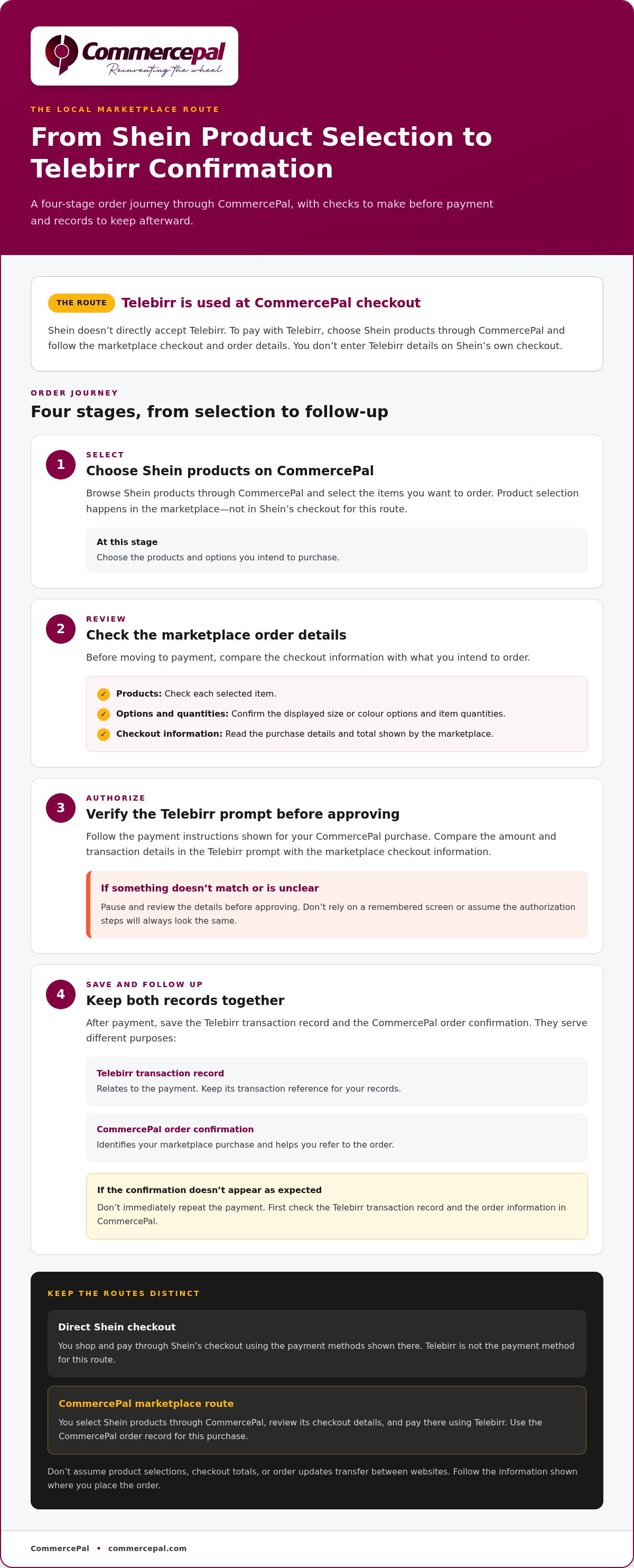
CommercePal connects Shein product discovery with a local checkout that supports Telebirr. The process has four clear stages: choose items, review the marketplace purchase details, follow the payment instructions, and save the confirmation and order information. This keeps product selection, payment, and follow-up easy to distinguish.
Use the details shown during your current checkout. Don’t rely on a remembered screen or assume the authorization steps will always look the same. Read each prompt and pause if the amount or transaction details don’t match what you expect.
From Shein product discovery to checkout
Browse Shein products on CommercePal and select the items you want to order. Before moving ahead, review your selections and the order details shown by the marketplace. Check that the products, options, and quantities are right, then read the checkout information carefully.
Keep each stage separate. Product selection is your choice of items. Checkout presents the purchase details. Telebirr authorization follows the payment instructions shown. Afterward, use the confirmation and order information to follow up.
- Select: Browse Shein products on CommercePal and choose the items you want.
- Review: Check your selection and the order information presented at checkout.
- Authorize: Follow the Telebirr payment instructions and verify the transaction details before approving.
- Follow up: Keep the payment record and marketplace order confirmation for reference.
What happens when you choose Telebirr?
Choosing Telebirr takes you to the payment authorization stage of your CommercePal purchase. Follow the instructions shown on screen instead of expecting a particular button or sequence. Before approving, compare the amount and transaction details with the checkout information. If anything differs or is unclear, stop and review the details first.
After payment, save the marketplace order confirmation alongside your Telebirr transaction record. The records serve different purposes: the transaction record relates to payment, while the order confirmation identifies your marketplace purchase. If the confirmation doesn’t appear as expected, don’t immediately repeat the payment. Check the transaction record and the order information in CommercePal first.
This is the practical flow behind how to pay for Shein with Telebirr: select products through CommercePal, review the marketplace checkout, authorize the payment, and keep both records. Start by exploring Shein products on CommercePal, then use the checkout details to guide your purchase.
What to Check Before Paying for Shein with Telebirr
A quick review before authorizing payment can help catch an incorrect item, option, quantity, or total. Compare the marketplace checkout details with the Telebirr authorization prompt. The amount and transaction information should match the purchase you intend to make. If they don’t, pause instead of approving a payment you can’t identify.
Review the order details before authorizing payment
Start with the products. Check each selected item, quantity, and any size or colour option shown. Then compare the checkout details with the Telebirr prompt. Confirm that the prompt relates to your purchase and that its amount matches the checkout total.
Use this quick comparison before approving:
| What to check | Compare or confirm |
|---|---|
| Product details | Selected items, quantities, and displayed size or colour options match what you intend to order. |
| Checkout total | The amount presented for checkout matches the amount shown in the Telebirr authorization prompt. |
| Payment status | Review the status shown after authorization. Don’t treat an unclear or unfinished payment message as proof that the order is confirmed. |
| Order confirmation | Keep the marketplace confirmation or order reference associated with the purchase. |
Pause if the prompt shows an amount or transaction detail you can’t connect to the checkout. Return to the order information and review it before continuing. Don’t rely on a remembered total or assume an unexplained difference is a standard charge. Use the information shown for your transaction rather than guessing about fees, exchange rates, refunds, or payment limits.
Keep a clear record of the transaction
After paying, save the marketplace order confirmation and the relevant Telebirr transaction reference. Keep them together in a secure note or folder so you can compare the payment record with the order if you need to follow up. Never include your Telebirr PIN or other private authorization details in your records.
Then review the order information in CommercePal for the latest status shown there. Your Telebirr transaction record and marketplace order confirmation have different purposes: one relates to payment, and the other helps identify the order. Keeping both makes it easier to explain the issue if payment appears complete but the order record is unclear.
If the records don’t line up, don’t submit another payment just to see whether it works. Contact CommercePal support with the relevant order information and transaction reference. These checks make how to pay for Shein with Telebirr more manageable by giving you a clear pause point before authorization and useful records afterward.
How to Pay for Shein with Telebirr: Step-by-Step
Browse Shein products through CommercePal, review the marketplace checkout, follow the Telebirr instructions, and save the order confirmation. The steps below keep product selection, payment approval, and follow-up distinct. Checkout wording can change, so follow the instructions currently shown rather than looking for a particular button or screen name.
Select Shein items and prepare the order
Start with Shein products on CommercePal. Choose what you want, then pause at checkout to review the selected products and order details. Check options such as size, colour, and quantity wherever they’re shown. Continue when the information matches your choices, using the platform’s instructions to move to payment.
- Browse: Open CommercePal and explore Shein products in its marketplace. Compare the product information shown before selecting.
- Choose: Select the intended product and any options displayed. Check each choice before adding it to your order.
- Review: Look over your selected items and quantities. Correct anything that doesn’t match what you meant to order.
- Read checkout details: Review the order information and total shown by CommercePal. Don’t estimate the total or rely on an earlier screen if checkout shows updated details.
- Continue using the platform’s instructions: Follow the checkout prompts to reach payment. Interface labels may vary, so use the wording currently displayed.
Choose Telebirr and complete the checkout
Select Telebirr as your payment method and follow the instructions shown. Keep the checkout and authorization information connected: confirm that the payment prompt relates to your purchase and review the amount before approving. Never share private payment credentials with anyone.
- Review the payment prompt: Compare the amount and transaction details with the marketplace checkout. Stop if something doesn’t match or you can’t identify the transaction.
- Authorize and check the result: Complete the steps shown in the Telebirr flow. Then return to the marketplace order information and check the confirmation or status shown for your purchase.
- Save your records: Keep the order confirmation and relevant Telebirr transaction reference. These details can help identify your order if you need to follow up.
On a phone, take the steps one screen at a time. Before leaving checkout, make sure you know whether the payment was authorized and where the order information appears. If payment seems complete but the order record is unclear, contact CommercePal support and keep the transaction reference handy.
Ready to begin? Browse Shein products on CommercePal and follow the checkout instructions for your order.
After Telebirr Payment: Track Your Shein Order with CommercePal
After paying, keep the marketplace order record and your Telebirr transaction reference together. The transaction reference helps identify the payment; the order confirmation identifies the purchase. Save both so you can find the right details when checking for updates or asking a question.
How to follow payment and order status
Open your CommercePal order information and review the latest status shown there. Use the marketplace record to check updates for your purchase. A Telebirr payment notification confirms payment activity, but it isn’t a substitute for the order information.
- Keep both records: Save the order confirmation and the relevant Telebirr transaction reference together.
- Check the marketplace: Review the order information for updates on your purchase.
- Compare if something looks unclear: Use the transaction reference to identify the payment and the order confirmation to identify the related purchase.
- Ask for help when records differ: If payment appears complete but the order information doesn’t clarify the status, share the relevant references with CommercePal support.
CommercePal offers 24/7 support for order questions. When you reach out, provide the order confirmation and payment reference so the issue can be connected to the right transaction. Keep private authorization details, such as your Telebirr PIN, to yourself. References help identify a payment or order; they don’t require sharing account credentials.
Order updates may appear at different stages. Check the order page when you need an update rather than treating the initial confirmation as a complete delivery timeline. If the status shown doesn’t answer your question, use your saved order details when contacting support.
Make the next Shein order easier
Organize order confirmations and transaction references by purchase. This makes it easier to distinguish orders and find the right details if you need help. You can also note the product options you selected, such as size or colour, for your own reference when browsing again.
Cash-back incentives are part of the CommercePal shopping experience, but the terms can differ by offer. Review the information shown for the specific purchase. For your next order, follow the same process: review the items, use the marketplace checkout details, and save your records after payment. This is a straightforward way to handle how to pay for Shein with Telebirr and keep your order information organized.
Shop Shein products through CommercePal and use the marketplace order details to guide your next purchase.
Plan Your Next Shein Order with Confidence
Before buying, decide what you’re looking for, compare the product details, and review checkout before authorizing payment. A deliberate check helps you confirm your choices and keep your order records organized.
If you’ve been searching for how to pay for Shein with Telebirr, start by choosing the products you want through CommercePal. Compare the available product details, check each selection carefully, and use the marketplace order information to guide your next step. Keep your purchase details handy so you can refer to them later.
Explore Shein products through CommercePal and shop when you’re ready. Shop Shein products and pay locally with CommercePal. Review the checkout details, complete payment with Telebirr, and save your order confirmation.
Frequently Asked Questions
Can I pay for Shein directly with Telebirr?
No. Shein doesn’t directly accept Telebirr. To use Telebirr for a Shein purchase, place your order through CommercePal, which lists Shein among its global retailers and supports Telebirr as a local payment method. Payment takes place through the marketplace checkout, not by entering Telebirr details on Shein. Keep your CommercePal order confirmation as a reference for the purchase.
How do I pay for Shein with Telebirr in Ethiopia?
Shop for Shein products through CommercePal, choose your items, and review the order details at checkout. Select Telebirr and follow the payment instructions shown. Check the transaction information before authorizing. After payment, save the marketplace order record and your Telebirr transaction reference together. This is the local marketplace route for how to pay for Shein with Telebirr.
Do I need a foreign bank card to order Shein through CommercePal?
No foreign bank card is required when you use a local payment method such as Telebirr through CommercePal. You can complete the purchase through the marketplace without entering card details on Shein. Review the payment details for your order and select Telebirr.
What should I do if Telebirr shows a successful payment but my order is not updated?
Don’t immediately pay again. Save the Telebirr transaction reference, then check the CommercePal order record for the latest information. If the payment appears successful but the order status is still unclear, contact CommercePal support and share the transaction reference and order details. Keep private credentials, including your Telebirr PIN, to yourself.
Can I use Telebirr to pay for any item on Shein through CommercePal?
Shop Shein products represented in the CommercePal marketplace and use Telebirr to pay for your purchase. Review the order details at checkout before authorizing payment. The checkout information connects the payment to the specific products and order you selected.
How can I confirm that my Shein order payment went through?
Check both the Telebirr transaction record and the CommercePal order information. The payment record helps confirm the transaction, while the marketplace order record identifies your purchase. Save the transaction reference and order confirmation together. If one record appears but the other is missing or unclear, contact CommercePal support with those details instead of submitting another payment straight away.
Is it safe to pay for a Shein order with Telebirr?
Use the CommercePal checkout, review the order and payment details, and authorize only when the transaction matches what you intend to buy. Never share your Telebirr PIN or other private credentials. Save your payment reference and order confirmation after checkout. These steps help protect your payment information and give you useful records if you need order support.


