

More devices don’t automatically make a home smarter. The essentials solve everyday needs: smart lighting, monitors, sensors, video doorbells and smart locks. For households exploring smart home devices in Ethiopia, energy controls can also monitor solar battery charge and switch off high-draw appliances when levels drop.
Easier routines and better awareness of what’s happening at home needn’t mean a complicated system. The right setup depends on your priorities, the devices you already use, and how your home connects to power and the internet.
This guide explains what each essential device does and where it can help. You’ll see how lighting and energy controls work, what sensors and monitors can adjust or detect, and how doorbells and locks can support home access. Use the overview to choose a practical starting point, then build around the needs that matter most in your home.
Key Takeaways
- Start with the home routine you want to improve, then choose devices that address it instead of adding technology without a clear purpose.
- Use smart lighting and energy controls to respond to natural light and monitor solar battery charge, including switching off high-draw appliances when battery levels drop.
- Place leak and air-quality monitors where they can help you notice changes early, and use sensor readings to guide practical home adjustments.
- Consider security sensors and a video doorbell with two-way audio to add awareness at entry points and communicate with visitors.
- Choose smart locks and interior sensors around the access and comfort needs of your household, and consider how each device connects with the rest of your setup.
Smart lighting and energy control
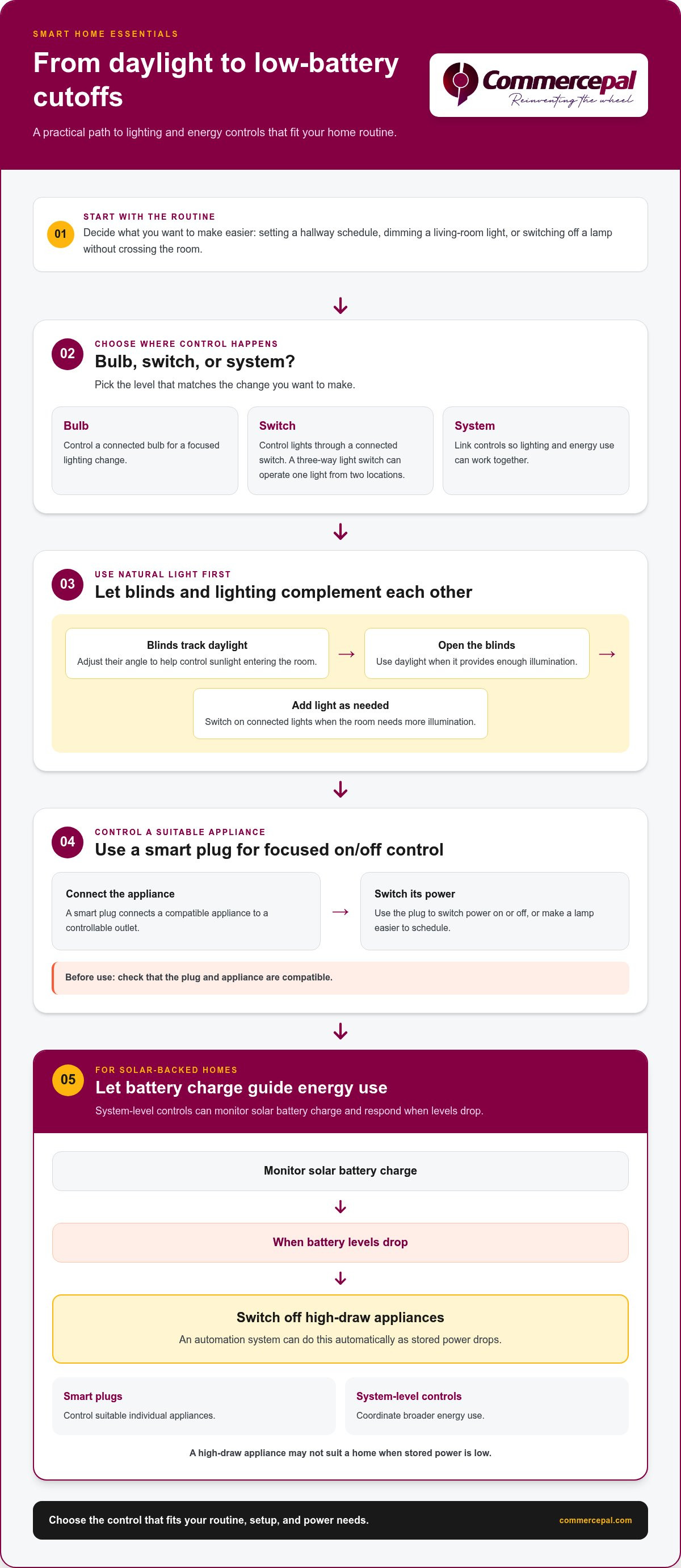
Smart lighting links bulbs, switches or controls so you can manage lights more conveniently. In Ethiopia, energy controls can also monitor solar battery charge and switch off high-draw appliances when levels drop.
Smart Lighting
Smart lighting lets you control connected bulbs or switches through a compatible system. Set a hallway schedule, dim a living-room light, or switch off a lamp without crossing the room. Choose based on the routine you want to change and whether you need control at the bulb, switch or system level.
Blinds that respond to natural light can track daylight and adjust their angle, helping control how much sunlight enters a room. They can complement lighting controls: open the blinds to use daylight, then switch on lights when the room needs more illumination. A three-way light switch lets you control a light from two locations, useful for a corridor or room with separate entrances.
Plug-Based Energy Control
A smart plug connects a compatible appliance to a controllable outlet, allowing you to switch its power on or off. It can make a lamp easier to schedule or help manage an appliance in a solar-backed home. Check that the plug and appliance are compatible before use.
In Ethiopia, a home automation system can monitor solar battery charge and switch off high-draw appliances automatically when battery levels drop. This makes appliance choice important: a high-draw device may not suit a home when stored power is low. Smart plugs can control suitable appliances, while system-level controls can coordinate broader energy use.
What are the best affordable smart home devices for Ethiopian homes? Start with a smart bulb or plug to make a focused change to lighting or energy use. Choose one that suits the routine, your setup and the appliance you want to control.
What customs duties, taxes, or import rules apply to smart home devices in Ethiopia? Import charges and requirements depend on the device’s customs classification and the applicable import rules. Factor them into the total cost of bringing a device into Ethiopia.
How much do smart home devices cost in Ethiopia in Ethiopian birr? The total cost depends on the device, its features, the seller and import costs. Compare the complete purchase cost for the bulb, plug or control system you need.
Which smart home brands and devices are compatible with Alexa, Google Home, or Apple HomeKit? Compatibility depends on whether a device supports Alexa, Google Home or Apple HomeKit. Match the platform listed for the device to the ecosystem you plan to use.
Are smart plugs, bulbs, cameras, and locks compatible with Ethiopia’s power supply and Wi-Fi? Compatibility depends on the device’s rated power input, plug format and network requirements, as well as your router. Check these details against the outlet and home network you plan to use.
How can I install and set up smart home devices in Ethiopia? Put the device where you’ll use it, connect it according to its instructions, then pair it with a compatible control system. Test a bulb’s switching or a plug’s connected appliance before relying on schedules.
What privacy, security, and power outage risks should I consider with smart home devices in Ethiopia? According to ETSI, internet-connected voice controls and devices on a local network can face security risks. A power outage can interrupt devices that depend on electricity. Some digital-ecosystem services also need access to resources outside the home, according to ETSI.
Leak and air-quality monitors
A leak monitor detects water where a pipe or appliance could drip, while an air-quality monitor tracks selected indoor conditions. In an Ethiopian home, place them around practical concerns such as a kitchen sink, bathroom pipe, or cooking area.
Leak monitors: catch water where it starts
A leak sensor detects water where it’s placed, often beneath a sink or beside a washing machine. Some models sound an alarm; connected models may also send an app alert. The response depends on the device and its connection.
Placement matters more than adding sensors at random. Put one near a water heater, under a kitchen sink or beside a pipe joint where a drip could go unnoticed. Keep it where water would reach it, not on a shelf above the likely leak. After placing it, use the device’s test function.
A sensor can alert you to water, but it can’t repair a pipe or stop a leak on its own. Treat an alert as a prompt to inspect the area, find the source and protect nearby belongings. If the sensor needs Wi-Fi or a hub, a network or power interruption may affect connected alerts. A local audible alarm works differently.
Air-quality monitors: understand indoor conditions
An air-quality monitor measures selected conditions in a room. Depending on its sensors, it may track particles, carbon dioxide, volatile organic compounds or humidity. Check the display or app to see which measurement is changing. A device that measures particles won’t necessarily measure every other air-quality factor.
For example, place a monitor in a living area where cooking smoke or dust may collect. Avoid putting it directly beside a stove, open window or fan: concentrated sources and moving air can skew readings for the rest of the room. A central position can better reflect the space people use.
A monitor measures air quality; it doesn’t clean the air. If readings change during cooking, opening a window or using an existing ventilation fan may help clear the room. Compare readings before and after. Follow the monitor’s care instructions, since dust on an air inlet can affect how it works.
Choose placement and alerts with purpose
Start with the location and problem: water beneath a sink calls for a leak sensor, while changing indoor conditions call for an air monitor. Then choose between a local alarm, phone notification or visible reading based on what suits the room. Check app and network requirements before relying on remote alerts.
For leak coverage, prioritize places where a small drip could remain hidden, such as behind a washing machine. For air readings, choose a regularly used room and keep the monitor away from direct cooking fumes. Keep both devices accessible for cleaning and testing. For related home-comfort options, browse home appliances alongside your monitor choices.
Security sensors and video doorbells
Security sensors and video doorbells help you notice activity around doors, windows and entry paths. A Wi-Fi video doorbell with two-way audio lets you see and speak with visitors through its connected system.
Use sensors to monitor entry points
Door and window sensors detect when a monitored opening changes state. A motion sensor detects movement in its coverage area. Together, they can help you tell whether activity happened at an entrance or inside a selected room.
Choose placement based on the entry you want to monitor. Put a contact sensor on a door or window that opens; position a motion sensor to cover a hallway leading from that entrance. Keep furniture and curtains from blocking its view. After installation, test it by opening the door or walking through its coverage area.
Alerts are most useful when they identify a specific event. A message that says the back door opened, for example, gives more context than a general activity notice. Review each sensor’s settings to avoid unnecessary notifications from routine movement at home.
What a video doorbell adds
A video doorbell combines a camera with a doorbell at the entrance. A Wi-Fi model with two-way audio can let you see a visitor and speak through the device. This is useful when you’re in another room or away from the entrance, provided the system and network are working.
Position the camera to capture the approach to your doorway. During setup, check the live view to see whether the frame includes a visitor’s face and the area directly in front of the door. A view aimed too high, too low or toward a bright window can make it harder to see what’s happening.
Before relying on recorded video, understand how the device handles clips, account access and storage. Depending on its design, a doorbell may store footage locally or use an online service. Keep the account password private and limit access to people who need it.
Plan for connectivity and privacy
Wi-Fi doorbells and connected sensors depend on their network for remote features. ETSI notes that smart voice-controlled devices rely on internet connectivity and may connect with other devices on a local network, creating security risks and possible attacks. Some digital-ecosystem services also need access to resources outside the home, according to ETSI.
Use a strong, unique password for your account and secure your home router with its own password. Review who can view alerts or video, and remove access when it’s no longer needed. Network interruptions can affect remote viewing and notifications, so treat a connected doorbell as an added monitoring tool, not a substitute for checking the entrance directly.
Choose sensors based on what you need to notice: an opening, movement or a visitor at the door. Then test each device’s alerts and camera view from the places you’ll use them. This practical check can reveal gaps in coverage before the system becomes part of your daily routine.
Smart locks
A smart lock controls a door’s locking mechanism electronically, for example with a keypad, fingerprint reader, phone app or connected home system. Its practical benefit is easier access management. A household could use a code instead of passing around a physical key. Entry methods vary by lock model.
Choose the access method that fits your household
Keypad locks suit homes where several people need separate access. Fingerprint models use a registered fingerprint, while app-controlled locks use a phone to manage entry. Some combine electronic access with a physical key. Choose a method everyone who needs entry can use, including children or household members without a smartphone.
Temporary access can help when a guest or trusted visitor needs to enter. If the lock supports temporary codes, set an access period that matches the visit, then remove or change the code afterward. Keep access details private. A code that remains active after a visitor leaves can create an avoidable security gap.
Check the door and lock fit
Before choosing a lock, inspect the door’s handle, deadbolt and lock position. A smart lock needs to fit the door and work smoothly with its existing mechanism. For example, a model that replaces a deadbolt differs from one that mounts over an interior thumb turn. Check the installation type and door measurements in the lock’s instructions.
Door alignment matters. If a bolt catches against the frame, electronic locking can fail even when the keypad or app works. Test the bolt manually before installation. Then operate the lock with the door open and closed to confirm it moves freely in both positions.
Plan for power and network interruptions
Smart locks use a power source, often batteries, to operate electronic features. Follow the model’s instructions for checking battery status and replacing batteries. Keep a physical key handy if the lock includes one. A dead battery or power interruption can affect electronic access, while phone-based features may also depend on the lock’s connection.
Wi-Fi or hub-connected locks can link access controls with other home devices, so account security matters. ETSI notes that smart voice-controlled devices rely on internet connectivity and may connect to devices on a local network, exposing them to security risks and attacks. Use a strong, unique account password and restrict access to household members who need it.
Set up access deliberately
During setup, follow the manufacturer’s instructions to pair the lock, register permitted users, and test each access method. Try the keypad or fingerprint reader before relying on it for daily entry. If the lock uses an app, test access while your phone is connected as directed. Keep a backup entry method ready for a network outage or misplaced phone.
- Choose the access method that suits each household member.
- Remove guest access after the visit ends.
- Test the lock from both sides of the door.
- Keep its backup key or access method in a secure place.
Smart sensors and interior settings
Smart sensors detect conditions such as occupancy, temperature or light, then help connected systems adjust interior settings. In a living room, for example, a sensor can trigger a lighting or climate change when conditions shift.
Match each sensor to a room need
An occupancy sensor detects movement in its coverage area. It can help control lights in a hallway or shared room where someone might otherwise leave them on. A temperature sensor measures warmth in a selected space, while a light sensor detects available daylight.
Choose a sensor based on the change you want to make. A light sensor near a window, for example, can help a connected system respond to changing daylight. Put a temperature sensor in a room where you want readings to guide heating or cooling controls. The sensor measures conditions; another connected device makes the adjustment.
Smart home sensors in Ethiopia can automatically adjust interior settings. A system might use light readings to coordinate blinds or lighting, or use occupancy to trigger a setting for a selected room. The result depends on the sensor, connected controls and routine you configure.
Place sensors for useful readings
Placement matters. A temperature sensor beside a sunny window may read differently from one away from direct sunlight. A movement sensor behind a large cabinet may miss activity in the area you want to monitor. Follow the device’s placement guidance, then check its readings from the areas where people normally use the room.
Start with a simple response. Connect one sensor to a hallway light and test whether it responds as household members pass. If it triggers too often, adjust its location or sensitivity using its controls. Set it for that space rather than applying the same rule across every room.
Plan around the home network
What internet speed and Wi-Fi setup do smart home devices need in Ethiopia? Requirements depend on the device and the data it sends. A sensor sending simple status updates has different demands from a camera transmitting video. Router coverage, walls, connected devices and internet reliability all affect performance.
Place the router where its signal can reach the sensors and controls you plan to connect. Test each device in its intended room, then check whether its readings and commands reach the app or hub. Some systems use a local hub, while others rely on internet services for remote access. Match your setup to the device’s stated connection needs.
To make a connected home easier to manage, explore practical home technology and build around the rooms and routines you want to improve.
CommercePal: Smartphones & Accessories
CommercePal helps you explore Smartphones & Accessories for the everyday technology that supports a connected home. If you’re comparing how to manage apps, alerts and device controls, consider the smartphone you use with your home setup.
CommercePal also offers Laptops & Computers and Home Appliances for broader household technology needs. Choose products based on your priorities, such as managing home settings from a phone or upgrading an appliance as part of a room refresh.
Explore the available categories at CommercePal, or contact CommercePal to continue your search.
Make your next smart-home choice count
Choose one everyday task you’d like to make easier, then let that goal guide your next decision. A connected home works best when each device has a clear role and fits your routines, rather than being added simply because it’s available. When considering smart home devices in Ethiopia, think about how you’ll use the system day to day and what should happen if internet or power is interrupted.
Consider which device you’ll use to manage settings and alerts. If you’re exploring a phone or accessories for your connected-home setup, browse CommercePal’s Smartphones & Accessories. The right starting point meets a real household need and works with your existing setup.
Contact CommercePal to explore your options and take your next step toward a home setup that suits you.
Frequently Asked Questions
What Are Smart Home Essentials?
Smart home essentials make household tasks easier, safer or more manageable. They typically pair a control method, such as an app or hub, with devices that respond to commands or detect changes. Someone in a rental, for example, might start with a connected bulb and phone control, while a household managing several rooms may prefer a hub to coordinate compatible devices.
What smart home devices are available in Ethiopia?
Smart home devices in Ethiopia include smart bulbs and plugs, leak and air-quality monitors, door and motion sensors, video doorbells, and smart locks. Some setups also use a hub to coordinate compatible devices. When exploring smart home devices in Ethiopia, compare connection methods, power requirements, app or hub needs, and compatibility with your planned setup. Availability varies by seller and device type.


