

The right-looking part can still be the wrong fit. To buy car spare parts online in Ethiopia, match the listing to your vehicle’s make, model, year, engine, and part number before ordering. Use your vehicle details and the markings on the old part to narrow your options.
It’s easy to focus on a photo or familiar part name, but small differences can affect compatibility. Compare the listing’s fitment details with your vehicle information, then check the part number, shape, and connection points where relevant. If a key detail doesn’t match, pause before ordering.
This guide explains how to search for parts online, which vehicle details to gather, and how to compare a listing with the part you need. You’ll also learn what to consider when a part number is missing or a listing covers several vehicle versions, helping you make a more informed choice before ordering.
Key Takeaways
- Gather your vehicle’s make, model, year, and engine details before browsing listings to narrow down compatible parts.
- Compare part numbers and visible features, not just product photos or broad part names, before ordering.
- Learn what to do when a listing covers several vehicle versions or doesn’t show a part number.
- See how to browse CommercePal’s available categories and find the right next step for your shopping needs.
Buy car spare parts online Ethiopia
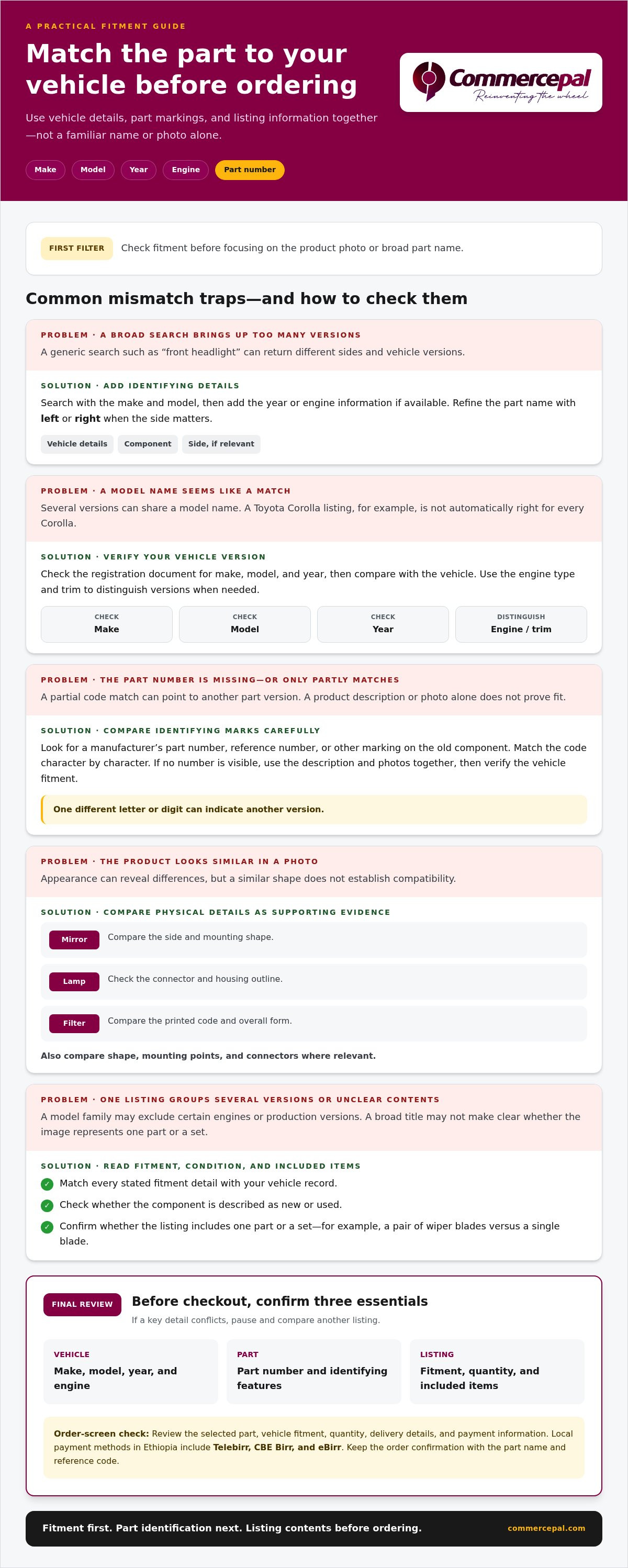
To buy car spare parts online in Ethiopia, treat fitment as your first filter, not a final check. A listing may use a broad name such as “brake pads,” while the right option depends on your vehicle’s details and the exact component. Before browsing, note the make, model, year, engine type, and part number from the old component or vehicle documents.
Start with the details that identify your vehicle. Check the registration document for its make, model, and year, then compare them with the vehicle itself. If several versions share a model name, the engine type and trim can help distinguish them. For example, a Toyota Corolla listing is not automatically a match for every Corolla version. Compare its fitment details with your vehicle.
Search with specific vehicle details
Search using specific details rather than a generic part name. Enter the make and model alongside the component, then add the year or engine information if available. A search for “front headlight” can return parts for different sides or vehicle versions. Refine it with “left” or “right” and your vehicle details. Keep the listing’s exact wording so you can compare results consistently.
Next, compare the listing with the part you’re replacing. Look for a manufacturer’s part number, reference number, or other identifying marks on the old component. Match the code character by character. Even one different letter or digit can indicate another version, so don’t rely on a partial match. If no number is visible, use the product description and photographs together; neither proves a fit on its own.
- Check that the listing names your make and model.
- Compare the year and engine details shown.
- Match the part number or reference code.
- Compare shape, mounting points, and connectors in the images.
- Confirm whether the listing is for the front or rear, left or right side.
Use photos to spot differences, not as a substitute for fitment information. For a mirror, compare the side and mounting shape. For a lamp, check the connector and housing outline. For a filter, compare the printed code and overall form. These checks can reveal mismatches, but a similar appearance alone doesn’t prove that a component suits your vehicle.
Read every fitment note before adding a part to your order. A listing may name a model family but exclude certain engines or production versions. Check each stated detail against your vehicle record. If the page groups several versions together, identify the one that applies to your car. Don’t assume a part fits just because the vehicle name appears in the description.
Review the listing’s condition and contents, too. Check whether it describes a new or used component, and note whether the image shows one part or a set. For example, a pair of wiper blades is different from a single blade, even if the title uses a broad category name. Read the included-item details and compare them with the component you intend to replace.
Before checkout, review the selected part, vehicle fitment, quantity, delivery details, and payment information on the order screen. In Ethiopia, local payment methods include Telebirr, CBE Birr, and eBirr. Select your intended payment option and make sure the order summary still shows the exact component you compared. Keep the order confirmation, including the part name and reference code.
Make one final check of three things: vehicle details, part identification, and listing contents. If a key detail conflicts, remove that option and compare another listing. This simple process helps you shop for automotive parts online with fewer avoidable mismatches and a clear record of what you selected.
CommercePal: Smartphones & Accessories
CommercePal offers smartphones and accessories for shoppers who want a phone or accessory alongside their online purchases. A smartphone can help you keep vehicle details, part numbers, and listing photos together as you compare car components. Save the make, model, year, and engine information in one place, then refer to it when reviewing fitment details.
CommercePal also offers laptops and computers, health supplements, and home appliances. Browse these categories when they suit your shopping needs, and use the vehicle information you gathered to make more focused decisions about parts. Keep product research separate from fitment checks: a device can help organize details, but compatibility still depends on matching the part to your vehicle.
Visit commercepal.com to explore CommercePal’s offerings, or contact CommercePal with your shopping questions.
Make Your Next Parts Search More Focused
Keep a simple digital record of your vehicle details and replacement-part information. Add clear photos of labels or markings when you can access the component. This gives you a practical reference for future maintenance and helps you compare listings without starting from scratch.
When you’re ready to buy car spare parts online in Ethiopia, use your record to narrow the options and focus on components that match your vehicle. CommercePal offers automotive parts as a place to continue your search. Keep compatibility at the centre of your decision, especially when a listing covers multiple versions.
For questions about shopping with CommercePal, contact CommercePal for help. Take the next step with your vehicle details close at hand, and make your parts search more deliberate.


