

When you buy genuine iPhone accessories Ethiopia, a polished photo or familiar logo isn’t enough to confirm what you’re getting. Check the product details against manufacturer information, then make sure the connector and features match your exact iPhone model.
It’s understandable to feel cautious. Listings can be difficult to assess, and cross-border shopping can raise questions about payment and delivery. This guide offers practical checks to help you compare products and review an order before checkout. CommercePal connects shoppers in Ethiopia with products from global retailers and supports local payment methods such as Telebirr, CBE Birr, and eBirr.
Start by identifying your iPhone model and connector type. Then compare the listing’s product information, compatibility, and seller details before ordering.
Key Takeaways
- To buy genuine iPhone accessories Ethiopia shoppers should compare product details with manufacturer information instead of relying on photos or packaging alone.
- Identify your exact iPhone model, then match it to the accessory’s stated compatibility and connector type.
- Use a pre-order checklist to review the product, seller information, and specifications before checkout.
- Check the final order summary for the item, applicable charges, and delivery information before placing an international order.
- CommercePal connects shoppers in Ethiopia with global retailers and supports local payment methods, including Telebirr, CBE Birr, and eBirr.
Buying Genuine iPhone Accessories in Ethiopia: What “Genuine” Means
Before comparing listings, decide what you mean by “genuine.” An Apple-branded accessory and a third-party accessory designed to work with iPhone are different products. A seller’s use of the word “genuine” doesn’t settle the question. Look for product details that support the specific claim being made.
A genuine accessory is one whose brand, product identity, and stated compatibility can be checked against information from Apple or the accessory’s manufacturer. Use this as a practical standard. It helps separate verifiable details from impressions created by a familiar logo, premium-looking packaging, or persuasive listing copy.
Genuine Apple accessories versus compatible third-party products
Apple-manufactured accessories are sold under Apple’s own brand. Third-party accessories are made by other companies. Some are designed for use with Apple devices, and certain accessories may be covered by Apple’s MFi Program, which relates to licensed technologies and compatibility for supported products. Check the current programme scope for the type of accessory you’re considering.
An MFi-related claim does not mean Apple made the product, and it shouldn’t be treated as proof that every accessory from a brand or listing is certified. Compatibility describes how a product is intended to work with a device; it doesn’t establish who made it. Neither category is automatically the better choice. Consider whether the product’s stated features, compatibility, and maker suit your needs.
What authenticity checks can, and can’t, tell you
Use several clues together rather than expecting a single check to confirm everything. Compare the exact product name, model identifiers, compatibility notes, and features with current information from Apple or the manufacturer. For third-party products, look for clear identification of the maker and accurate wording about compatibility.
Packaging and logos can help you compare a listing with official product information, but they can be copied or shown in photos that don’t represent the item you’ll receive. A polished image is not proof. Treat seller descriptions and serial or model numbers as clues, not standalone authentication. A number may be mistyped or reused, and verification processes differ by accessory type.
- Check the claim: Is the listing describing an Apple-branded product or a compatible third-party accessory?
- Compare identifying details: Do the product name and specifications align with the manufacturer’s information?
- Read the wording carefully: Does the listing claim Apple made the item, or only that it works with an iPhone?
When you buy genuine iPhone accessories Ethiopia, keep the distinction clear as you browse international listings. A product can be compatible without being Apple-made, and an authentic-looking presentation can’t establish either claim. Compare the product details, then check model fit separately before ordering.
How to Check an iPhone Accessory Before You Buy
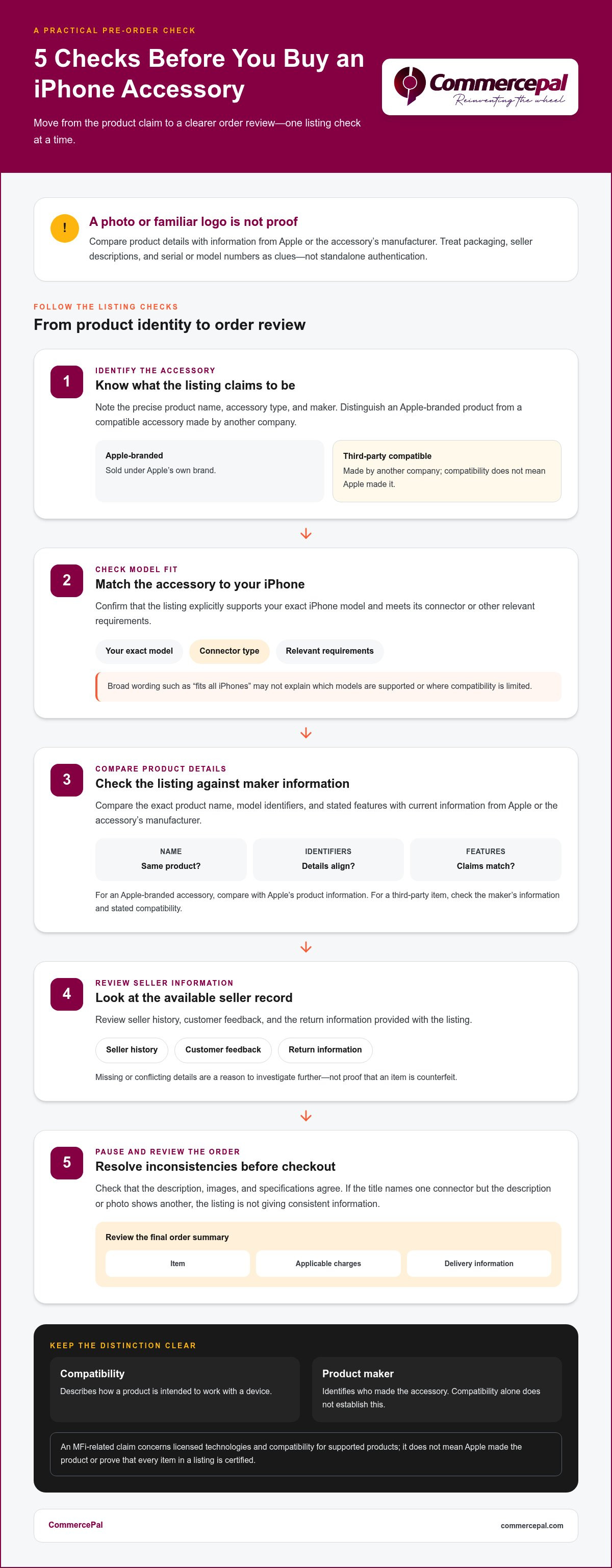
Use the same checks for each listing. Identify the accessory and whether it’s Apple-branded or made by another company. Confirm model fit, compare specifications, review seller information, and check that the listing details agree before ordering. These steps can help you spot unclear or conflicting claims, though they don’t prove authenticity on their own.
- Identify the accessory: Note its precise product name, type, and maker as described in the listing.
- Check model fit: Confirm that the product explicitly supports your iPhone model and meets its connector or other relevant requirements.
- Compare the details: Match the name, model identifiers, and stated features against current information from Apple or the accessory’s manufacturer.
- Review the seller information: Read the seller history, customer feedback, and return information available with the listing.
- Pause before ordering: Check that the description, images, and specifications agree, then review the order details.
Check the listing details and seller information
Look for a specific description rather than broad phrases such as “fits all iPhones.” Compatibility information should name supported models or explain the relevant limits. Check that the images show the same kind of item described in the text. Review the seller’s available history, customer feedback, and stated return information. Missing or conflicting details are a reason to investigate further, not proof that an item is counterfeit.
Pay attention to specifications that change between the title, description, and images. For example, if a title names one connector but the description or photo shows another, the listing doesn’t provide enough consistent information to make a confident choice.
Use Apple information carefully when checking authenticity
For Apple-branded accessories, compare the listing’s product name and details with Apple’s Official Accessories Page. For third-party products, check the maker’s own information for product identity and stated compatibility. Apple’s guidance can differ by accessory type, so use the current support information relevant to the item.
A serial number or other verification feature may not apply to every accessory, and a number alone isn’t conclusive proof. Compare all available details. A useful rule is: identify the item, verify its model fit, compare its specifications with the maker’s information, and review the seller and order terms before paying.
Explore smartphone accessories through CommercePal as you compare listings, and apply the same checks to each product.
Match iPhone Accessories to Your Model, Connector, and Needs
Compatibility starts with your exact iPhone model, not just the brand or product category. Find the model name in your iPhone settings or check Apple’s model information, then compare it with the accessory’s supported models. A cable can have the right connector but lack a feature you need. A case that looks close may have the wrong camera cutout.
Check Lightning and USB-C compatibility
Identify the port on your iPhone before choosing a cable. Apple’s model information can help confirm which connector your device uses. As a general guide, iPhone 15 and later models use USB-C, while earlier models use Lightning. Check your exact model rather than relying on a broad “for iPhone” label.
| Connector | Compatibility check |
|---|---|
| Lightning | Match the cable or accessory to an iPhone model with a Lightning port. Apple provides guidance on identifying counterfeit Lightning accessories. |
| USB-C | Match the cable or accessory to an iPhone model with a USB-C port, then check the product’s supported models and features. |
Connector fit is only part of the check. Data transfer and charging capabilities can differ, so compare the accessory’s specifications with Apple’s current information for your iPhone. Charging speed depends on the iPhone, the cable or charging accessory, and the compatible power adapter used together. A cable’s connector alone doesn’t tell you how quickly it will charge.
Choose cases, chargers, and MagSafe accessories by use
Cases and screen protectors need to match your exact model. Compare the supported models, dimensions where provided, and camera layout. Two phones that look similar may have different body dimensions or camera placements, so a near-match can obstruct a lens or leave part of the screen uncovered.
MagSafe is a compatibility feature associated with iPhone 12 and newer models, but check Apple’s model details and the accessory’s requirements before choosing a product. Not every magnetic accessory offers the same functions. For chargers and cables, compare the specifications with Apple’s current recommendations for your device. This helps distinguish basic connector fit from the charging setup you need.
When you buy genuine iPhone accessories Ethiopia, follow this order: confirm your iPhone model, identify its port, then match the accessory type and stated features. A connector match is useful, but model-specific support completes the compatibility check.
Order iPhone Accessories in Ethiopia: A Practical Shopping Checklist
A smooth cross-border order starts with choosing the right product. Write down your exact iPhone model and the accessory type you need, then use those details to search a marketplace. Compare the listing’s compatibility and specifications with the manufacturer’s information. This helps you rule out products that don’t fit before reviewing payment and delivery details.
Prepare your product and order details
Keep your model name handy, along with any connector or accessory requirements. As you browse, review the product description, supported models, item details, seller information, and order terms. For a cable, check both its connector and its stated charging or data features. Don’t rely on “for iPhone” when model-specific information is available.
Follow the marketplace’s purchase steps: select the item, review your selection, and continue to checkout. Before submitting an order, check the final summary. Confirm the item and options, then review any applicable charges and the delivery information shown for that order. Use the final summary rather than assuming details from a search result or an earlier product page.
Save your order confirmation and related details. Keeping them accessible makes it easier to refer to the item you selected if you have a question later.
Pay locally and follow the order journey
CommercePal is an Ethiopian marketplace that aggregates products from global retailers. It supports local payment methods including Telebirr, CBE Birr, and eBirr. Choose from the options shown during checkout and follow the on-screen steps. Before completing payment, check that the item, payment method, applicable charges, and delivery information in the order summary are correct.
International shopping involves choosing a product, completing checkout, and following the order information provided. Read each step on screen and keep your confirmation details. If you’re comparing the process for buying smartphones online in Ethiopia, the same habits apply: check what you’re ordering, review the total and delivery details, and retain your order information.
Careful checkout is part of the decision when you buy genuine iPhone accessories Ethiopia. Verify the product fit, then review the final order summary before paying. Browse smartphone and accessory shopping on CommercePal to compare products from global retailers.
Shop for iPhone Accessories Through CommercePal
CommercePal gives shoppers in Ethiopia a local marketplace for discovering products from global retailers. It aggregates items from various international platforms, including smartphones and accessories. Browse global options in one place, then assess the specific product against your needs. Product listings can change, so review the current details for each item you’re considering.
A local marketplace for global shopping
CommercePal connects worldwide retail platforms with shoppers in Ethiopia. Browse for an item that suits your needs, then use its listing information to assess the product. The retailer names describe the types of platforms CommercePal sources products from, not a guarantee that a particular accessory will appear in the marketplace.
Keep your own product checks in the process. For each listing, compare the stated brand, model compatibility, and specifications with current manufacturer information. Access to a product listing is not proof of authenticity, so assess the specific item rather than relying on a category label or general search result.
If you’re researching how to choose and order a phone, the guide “The Ultimate Guide to Buying Smartphones Online in Ethiopia” can complement this accessory checklist. Apply the same habits: read the product information carefully, understand what you’re selecting, and review checkout details before ordering.
Take the next step with confidence
Have your exact iPhone model ready before selecting an accessory. Check that the listing names your model or clearly states its supported devices, then review the product description and order information. If you’re comparing options, note their stated compatibility and features so you can see which best fits your phone and intended use.
CommercePal supports local payment methods including Telebirr, CBE Birr, and eBirr. It also offers 24/7 support and cashback incentives. Review the listing and checkout information for the item you choose, including the order and delivery details shown during checkout. These checks help you understand the purchase before completing it.
If you want to buy genuine iPhone accessories Ethiopia, combine product checks with a careful review of the order details. CommercePal offers a local way to explore products from global retailers, while checking your iPhone model helps narrow down what fits. Explore the CommercePal marketplace and compare current product details as you browse.
Make Your Next Accessory Choice with Confidence
Your next purchase can be more straightforward when you treat each listing as something to verify, not a guess. Compare the product with your needs and choose based on clear details, not a familiar logo or a low price alone. The same habit can help with future phone accessories.
When you’re ready to buy genuine iPhone accessories Ethiopia, use CommercePal to explore products from global retailers. CommercePal serves shoppers nationally across Ethiopia, offering a local route to global shopping. Review the current listing and checkout details, and select an item when the information fits what you need.
Explore CommercePal and shop global products. Start with your iPhone model and compare the available product details.
Frequently Asked Questions
Can I buy genuine iPhone accessories in Ethiopia?
Yes. Shoppers in Ethiopia can look for Apple-branded accessories and compatible products from other brands through online marketplaces. If you’re searching for “buy genuine iPhone accessories Ethiopia,” distinguish between an Apple-made item and a third-party accessory designed for iPhone. Compare product details with manufacturer information and review the seller details available. A convincing photo or authenticity claim alone doesn’t establish what the item is.
How can I tell if an iPhone charger is genuine?
Compare the charger’s exact name and specifications with current information from Apple or the manufacturer. Check what the listing includes, since a cable and power adapter may be separate items. Look for consistent descriptions and available seller history or customer feedback, but treat these as clues rather than proof. Packaging, logos, and serial numbers aren’t conclusive on their own. Check Apple’s current support guidance for the charger type.
Are MFi-certified accessories the same as genuine Apple accessories?
No. MFi refers to Apple’s programme for certain third-party accessories intended to work with Apple products, not accessories manufactured by Apple. A compatible accessory may be made and branded by another company. If a listing mentions MFi, assess the claim for that specific product and check Apple’s current information about the programme’s scope. Then compare the accessory’s stated compatibility with your iPhone model.
How do I choose an iPhone accessory that fits my model?
Find your exact model name in Settings under General and About, or use your device’s product information. Compare that model with the accessory’s supported-device list. For cables and chargers, identify the port and check the stated charging or data features. For a case or screen protector, make sure the listing names your exact model, since camera placement and dimensions can differ. Check MagSafe requirements separately rather than assuming every model supports every accessory feature.
Can I pay for iPhone accessories online in Ethiopia using Telebirr?
Yes, CommercePal supports Telebirr, CBE Birr, and eBirr as local payment methods. Browse for an item, review its listing, select it, and follow the payment options shown during checkout. Before paying, check that the order summary reflects the item and options you selected. For more detail on paying for international purchases with local methods, refer to CommercePal’s guide to paying for global tech with Telebirr and CBE Birr.
Does CommercePal guarantee that every iPhone accessory is genuine?
A marketplace listing alone doesn’t establish authenticity. CommercePal aggregates products from global retailers and offers smartphones and accessories, but you should assess the details for each item. Review the maker, product description, stated compatibility, and seller information shown with the listing. If the product or its specifications aren’t clearly identified, compare the available details before ordering. Don’t rely on a general marketplace label or seller claim instead of checking the specific item.
What should I check before ordering iPhone accessories internationally?
Start by confirming that the accessory fits your iPhone, then review the selected options and quantity. At checkout, read the final order summary, including applicable charges and the delivery information shown for that order. Don’t assume a fixed arrival date if timing isn’t stated. After purchasing, keep the confirmation and order details together so you can refer to the exact transaction if you have a follow-up question.


