

The accessory that looks like a perfect fit may still be wrong for your Galaxy. When shopping for Samsung phone accessories online, match a case or screen protector to your exact phone model and variant. A small difference in the model name can mean a poor fit, even between phones in the same series.
Before comparing prices or features, find your phone’s full model name and note what you need the accessory to do. Then compare the details that matter for that item, such as cut-outs for a case or connector type for a cable. These checks help you avoid buying on the strength of a broad product title alone.
This guide explains how to identify compatible accessories, compare common options, and shop global products through CommercePal, an online marketplace serving Ethiopia. CommercePal supports local payment methods, including Telebirr, CBE Birr, and eBirr. Use the steps below to compare listings and review your order before checkout.
Key Takeaways
- Use your Samsung phone’s exact model name to narrow down compatible accessories, rather than relying on a broad series label.
- Compare cases, screen protection, chargers, audio accessories, and power banks by their purpose and compatibility details.
- When searching for Samsung phone accessories online, check connector and charging standards as well as device fit.
- Review the listing’s specifications, included items, and order details before checkout.
- Browse global accessory listings through CommercePal and use local payment methods at checkout.
Samsung Phone Accessories Online: Start With Your Galaxy Model
Confirm your exact Samsung phone model before choosing an accessory. Compatibility means the product’s stated fit matches your specific device, not simply that both carry the Samsung name. This matters most for accessories shaped to the phone, but it can also matter when an item relies on a particular port or supported feature.
Galaxy phones can look similar while differing in size, button placement, camera layout, connector location, or feature support. A case designed for a related model might cover a button or leave the camera opening misaligned. A screen protector might not cover the intended display area. Check your model details first, then compare them with the accessory listing.
The Samsung Galaxy ecosystem spans multiple device lines and generations, so a family name alone may not identify the right match. If you’re also comparing phones before choosing accessories, this guide to buying smartphones online in Ethiopia can help you assess the device purchase with the same care.
How to identify your exact Samsung phone model
Look in your phone’s settings for the device information section, often labelled “About phone.” You can also check the original device information or packaging. Note both the commercial name, which identifies the phone in everyday terms, and the model code, a more specific identifier that may appear in product details. Keep these details handy while searching and checking accessory descriptions.
Why a close-looking model name is not enough
Similar names can refer to different generations or sizes. Those differences can affect the phone’s dimensions and the position of its camera, buttons, or ports. Supported features may vary too, so an accessory relying on a particular connection or function may not suit every device in the same family. Match the listing’s compatible-model details to your phone instead of relying on the brand or series name alone.
Before browsing Samsung phone accessories online, write down the full model name and, where available, the model code. Use them as search terms and as your final fit check. If a listing names only a broad Galaxy family, compare its compatibility details with the information you recorded before deciding whether it is a match.
How to Check Samsung Accessory Compatibility Before Ordering
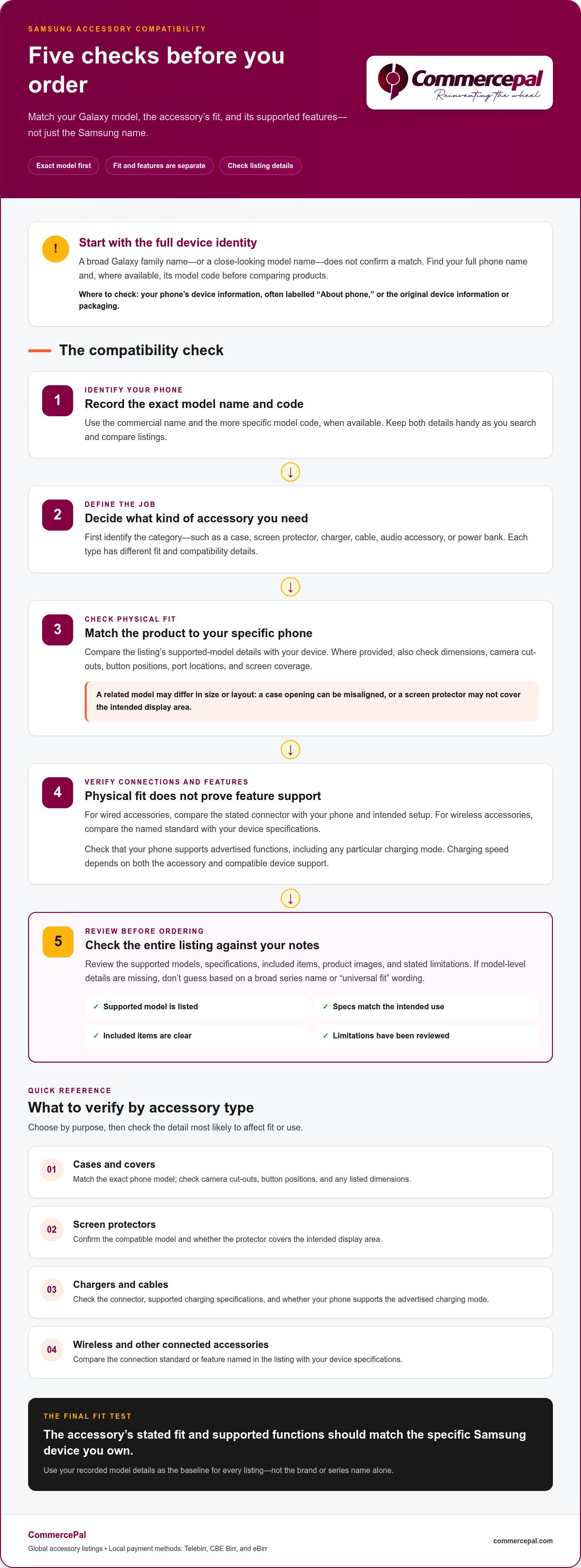
Use a quick compatibility check before placing an order. Match the accessory’s stated fit and functions to your specific phone, not just to the Samsung brand. An item can fit physically yet lack a feature you want, so assess its shape and supported functions separately. This makes comparing Samsung phone accessories online more straightforward.
Work through these checks in order:
- Confirm the model. Use the full device name or model code from your phone’s settings or original device information. Compare it with the models named in the listing.
- Identify the accessory type. Decide whether you’re checking a case, screen protector, charger, cable, audio accessory, or another item. Each type has different fit requirements.
- Match the connector or standard. For a wired accessory, compare its stated connector with your phone and intended setup. For wireless accessories, compare the standard named in the product details with your device specifications.
- Separate fit from features. Check whether your phone supports the functions advertised, such as a particular charging mode. Physical fit alone does not establish feature support.
- Review the full listing. Read the supported models, specifications, included items, images, and stated limitations. Make sure the details align with your phone’s information.
Model compatibility means the accessory’s stated fit and supported functions match the specific Samsung device you own. Use this as your baseline, then check the details for each accessory category.
Match cases, covers, and screen protection to the device
Compare the listing’s compatible model name directly with your verified phone model. If dimensions or design details are provided, check the camera cut-outs, button positions, and screen measurements too. A case for one generation may not fit a similarly named phone from another generation. A shared brand or family name is not proof of a match.
Check charging and connection details
For chargers and cables, compare the connector stated in the listing with your phone and the setup you plan to use. Then review the supported charging specifications. Charging speed depends on both the accessory and compatible device support, so a speed claim may not apply to every Samsung phone. Check the conditions stated in the listing.
Read listing details as a compatibility checklist
Check the supported-model list, product images, included items, and stated limitations before ordering. A phrase such as “universal fit” does not establish that a shaped accessory suits your phone. Compare the listing with your device information, and don’t guess when model-level details are missing. Once you’ve narrowed down the match, browse accessory listings on CommercePal.
Compare Samsung Phone Accessory Types by Everyday Use
Choose an accessory for the job you want it to do, then check the details that matter for that category. A case, charger, and power bank solve different everyday needs, even though all may be listed as phone accessories. Use this comparison as a starting point before reviewing individual products.
| Accessory type | Main use | Compatibility check |
|---|---|---|
| Cases and covers | Cover the phone’s body and provide a grip or style preference. | Match the exact phone model; review camera, button, and port openings. |
| Screen protection | Cover the display surface. | Compare the stated model and screen dimensions or fit notes. |
| Wall adapters and cables | Connect a phone to a power source. | Check connector type and supported charging standards. |
| Wireless charging accessories | Charge a compatible phone without a cable connection to the device. | Compare the stated standard with the phone’s supported specifications. |
| Audio accessories | Support listening or calls, depending on the product. | Check the connection type and any required device support. |
| Power banks | Provide portable power away from a wall outlet. | Review connector, supported charging standard, and included cable details. |
Protection accessories are chosen for how they fit and cover the phone; charging and audio accessories depend on connection types and supported features. Keep that difference in mind as you browse Samsung phone accessories online. It helps you compare relevant specifications rather than unrelated features.
Protection accessories: cases and screen protection
A case covers the phone’s body, while a screen protector is designed for the display. Check that each listing names your exact model, then look for fit details such as camera cut-outs, button access, and screen dimensions. Material, thickness, texture, and design are matters of preference, but they do not guarantee a particular level of protection. Choose the style and fit that suit your needs.
Charging, audio, and portable power
Wall adapters and cables connect your phone to a power source, while wireless charging accessories rely on a compatible charging standard. Audio products may connect through a cable or wirelessly, so check the listing’s connection details and your phone’s support. A power bank provides portable power; compare its stated connectors and supported standards rather than assuming every model works the same way. Review product specifications for charging claims, and don’t infer speed or capacity from the accessory category alone.
Before deciding, identify your main use: everyday carrying, display coverage, charging at a desk, listening, or portable power. Then compare the relevant details in the listing. Check what’s included, too. An item shown in a product image, such as a cable or adapter, is not necessarily included unless the listing says so. This keeps your comparison focused on fit, function, and what you’ll receive.
A Practical Checklist for Ordering Samsung Accessories Online in Ethiopia
Approach your order in two stages: first narrow your search to accessories intended for your exact Samsung model, then check the listing and checkout details. Separating product selection from order planning makes it easier to keep compatibility in focus while reviewing payment and delivery information.
Use this quick checklist before placing an order:
- Search using your phone’s verified model name and the accessory type, such as a case, cable, or audio accessory.
- Compare the listing’s compatible models and specifications with your device information.
- Review product images, description, stated features, limitations, and included items.
- Read the checkout information for order details and delivery expectations.
- Confirm the payment option and final order details before completing checkout.
Review the listing and order details
Read beyond the product title. Look for compatibility wording in the description, compare images with the written details, and check whether any cable, adapter, or other item shown is included. Similar accessory types can have different specifications, so use the details on the specific listing you’re considering.
At checkout, review the order information for that purchase, including delivery expectations and applicable terms. Timing and order conditions can depend on the listing, so don’t apply one product’s delivery information to another order. For a wider look at marketplace shopping and payment, consult our complete online shopping and payment guides to ensure a smooth transaction.
Use local payment options and understand shipping information
CommercePal serves shoppers across Ethiopia and supports local payment methods, including Telebirr, CBE Birr, and eBirr. Select the payment option that suits you during checkout, then review the order summary before paying. CommercePal offers free shipping on orders over 5,000 ETB. Review the shipping information for your purchase so you understand how it applies to the order.
Keep product selection and delivery details connected, but distinct. A listing may suit your phone, while its order information still needs a careful read. Review the shipping details shown for your order rather than assuming delivery timing, fees, or other terms based on a different product or retailer.
After matching the accessory to your phone and reviewing its order details, browse Samsung phone accessories online on CommercePal.
Shop Samsung Phone Accessories Through CommercePal
CommercePal connects shoppers across Ethiopia with products from global retailers through one online marketplace. Browse accessory options, compare each listing’s compatibility details with your Samsung phone, and review the checkout information for the order you choose.
Start with your phone’s exact model and the accessory category you need. Open a relevant listing and compare its compatible models, specifications, images, and included items. A case and a charger need different checks, so focus on the details that matter for the accessory rather than relying on a broad Samsung label. Before ordering, review checkout information, including delivery expectations and applicable order terms.
A more locally manageable way to shop globally
CommercePal’s marketplace brings together products from international retailers, giving you access to global accessory options. Browse available listings and compare their product details. At checkout, local payment methods include Telebirr, CBE Birr, and eBirr. Choose from the payment options presented, then review the order summary before completing your purchase.
CommercePal offers free shipping on orders over 5,000 ETB. Review the shipping information shown for your order to understand the delivery expectations. The marketplace also offers 24/7 support and cashback incentives. Check the information provided for your order and any applicable incentive as you shop.
Choose carefully, then browse with confidence
Make compatibility your first step. Use the full model name or model code from your phone’s device information, then compare it with the compatible-model details in the accessory listing. Review the specifications and included items, then read the checkout information for payment, shipping, and delivery expectations before confirming your purchase. This keeps the product choice and order details clear as you compare options.
Browse phone accessories on CommercePal to compare available listings for your Samsung model and review the product and checkout details before ordering.
Make Your Next Accessory Choice with Confidence
Start with what you need from your phone, not with a long list of features. Note the accessory’s purpose, keep your device details close, and compare listings with the way you use your Samsung each day. A careful fit check can make choosing Samsung phone accessories online more manageable.
CommercePal brings global product discovery together with local checkout options, including Telebirr, CBE Birr, and eBirr. Orders over 5,000 ETB qualify for free shipping. The marketplace also offers 24/7 support and cashback incentives. Review your order details and information about any applicable incentive as you shop.
Compare available phone accessory listings, read the specifications, and review the order information before deciding. Browse phone accessories on CommercePal and find an option that fits your device and everyday needs.
Frequently Asked Questions
How do I know which Samsung accessories fit my phone?
Compare your phone’s exact model name or code with the accessory’s compatible-device information. A search result that says “Galaxy accessories” may cover several devices, so open the listing and look for a clear model match. For a case, check that the listing names your specific phone rather than only its broader series. For connected accessories, review the stated connector and features too.
Can I use one Samsung charger with different Galaxy phones?
One charger may work with more than one phone if their connectors and supported charging specifications are compatible. Check the charger, cable, and each phone as a set. A connector that fits does not automatically mean a particular charging feature or speed is supported. Compare the specifications for the devices you plan to use, rather than choosing based only on a familiar brand name or product photo.
What should I check before buying a Samsung phone case online?
Match the case to the exact phone model, then inspect the listing for fit details such as camera openings, button access, and stated dimensions. Check the product description and what it says is included. If you’re comparing cases for two similarly named phones, treat them as separate options unless the listing clearly indicates both are compatible. This helps you avoid relying on appearance alone.
Are Samsung phone accessories available for delivery across Ethiopia?
CommercePal serves shoppers nationally in Ethiopia and provides marketplace access to products from global retailers. Review the selected listing and order details at checkout for the information that applies to your purchase. For Samsung phone accessories online, use the specific product and delivery details rather than assuming every accessory follows the same process.
Can I pay for Samsung phone accessories with Telebirr?
Yes. CommercePal supports Telebirr, alongside CBE Birr and eBirr. Select an accessory listing, review its product details, and choose an available payment method at checkout. Before confirming, make sure the order summary reflects the item you chose and the payment option you intend to use.
How long does it take to receive phone accessories ordered online?
Delivery timing depends on the specific listing and the fulfillment details shown during checkout, so there isn’t one timeframe for every accessory order. Review the delivery information displayed for your chosen item before paying. After purchase, refer to the order details for that transaction. Don’t use the delivery information on one listing to predict when a different item will arrive.
Does free shipping apply to every CommercePal order?
Review the shipping information for your selected items and the final cart details to see how it applies to your order. Confirm the shipping information shown before completing payment, especially if your cart contains items from different listings.


