

eBirr lists 203,174+ merchants for payments in Ethiopia, but that figure doesn’t identify which merchants accept payments online. Look for eBirr as a payment option at an online store’s checkout. If it appears, follow the prompts to complete your payment from your eBirr account.
It’s easy to want a clear list of eBirr compatible online stores before you shop. This guide explains how to spot eBirr at checkout, what to do if a payment needs support, and which financial institutions connect with the service: Nib International Bank, Wegagen Bank, Ahadu Bank, KAAFI Microfinance, and Cooperative Bank of Oromia. You’ll also get a practical overview of paying with eBirr online, so you can choose the right payment route and know where to turn when you need help.
Key Takeaways
- Learn how to recognize an eBirr payment option at checkout and follow the steps to complete an online purchase.
- Understand how using the eBirr app or USSD can affect the way you pay while shopping online.
- Know what transaction details can help when you need support with a payment.
- Explore CommercePal’s smartphones, laptops, health supplements, and home appliances, with eBirr available as a local payment option.
How do I pay online with eBirr?
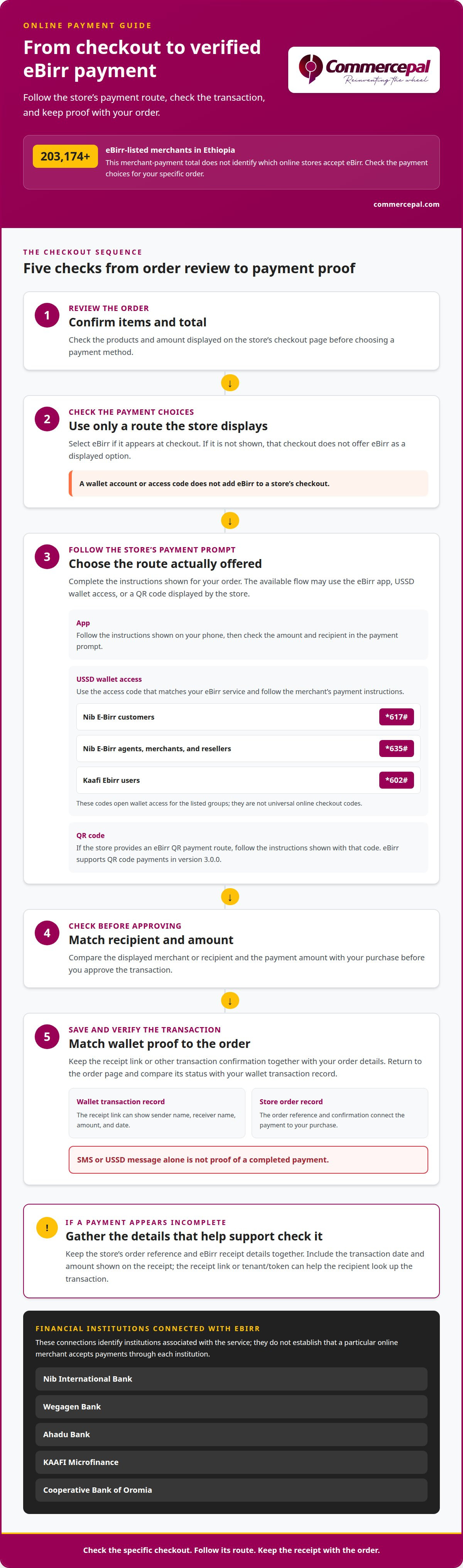
Start at the store’s checkout, not with an assumption about acceptance. eBirr lists 203,174+ merchants for merchant payments in Ethiopia, but that total does not identify online sellers. Look for eBirr among the payment choices shown for your order. If it appears, select it and follow the checkout instructions to pay electronically from your eBirr account. If it does not appear, that checkout does not offer eBirr as a displayed option.
Follow the payment details shown for your specific order. Before approving, compare the displayed merchant or recipient and amount with your purchase. Keep the order information and payment confirmation together. These details can help you explain the transaction if you need assistance from the store or eBirr.
Use this checkout sequence:
- Review the order. Confirm the items and total shown on the store’s checkout page.
- Choose eBirr. Select it only if the merchant presents it as a payment option.
- Follow the payment prompt. Complete the instructions displayed by the store or payment flow.
- Save the transaction record. Keep the receipt link or other confirmation with your order details.
- Check the outcome. Use the transaction receipt to distinguish a completed payment from an unverified message.
Checkout is the key decision point. An eBirr account supports electronic payments, but the merchant must offer eBirr for that purchase. A large merchant count does not mean every online store accepts the wallet. To find eBirr compatible online stores, check the payment methods for the specific product or order at checkout, rather than relying on a general merchant total.
eBirr also supports QR code payments in version 3.0.0, dated 03/25/2025. A store may present a QR code as its payment route. Use the payment instructions shown with that code, then retain the receipt. QR support does not by itself mean that every website accepts eBirr or displays a scannable code.
Keep payment proof separate from a text alert. A USSD message or SMS alone does not prove that an eBirr payment was completed. The receipt link can show transaction data, including sender name, receiver name, amount, and date. Use these details to match a payment with an online order. A payment recipient can use the receipt link or tenant/token to look up a transaction. An order confirmation and a wallet transaction record document different parts of the purchase.
eBirr connects five Ethiopian financial institutions: Nib International Bank, Wegagen Bank, Ahadu Bank, KAAFI Microfinance, and Cooperative Bank of Oromia. This connection may matter if your wallet access or account setup is associated with one of them. These names identify institutions connected to eBirr, but do not establish that a particular online merchant accepts payments through each institution.
If a payment appears incomplete, gather the store’s order reference and eBirr receipt details before seeking help. Include the transaction date and amount shown on the receipt. Don’t rely on an SMS or USSD notification alone. The receipt gives the store or payment support team details to investigate, while the order reference connects the payment to your purchase.
Can eBirr be used for online shopping through an app or USSD?
Yes. eBirr customers can use electronic money on their mobile phones to shop. Whether an app or USSD completes a particular online order depends on the payment route the store offers. An app or wallet access code lets you reach your account, but doesn’t mean a merchant accepts eBirr at checkout.
Start with the store’s payment page. If eBirr is listed, follow its displayed instructions and use the mobile access method available to you. If the checkout shows a QR code, eBirr supports QR code payments in version 3.0.0. That version added the feature on 03/25/2025. Use the payment path the merchant actually provides, rather than assuming every online store supports the same flow.
USSD access codes differ by eBirr service. The available codes include:
- Nib E-Birr customers: Dial *617# to access the wallet.
- Nib E-Birr agents, merchants, and resellers: Dial *635# to access the wallet.
- Kaafi Ebirr users: Dial *602# to access the wallet.
These codes provide wallet access for the named user groups, but don’t establish that a particular online store accepts USSD payments. For an online order, first find the merchant’s eBirr payment instructions. Then use the relevant wallet access method to follow the steps provided. A USSD code is not a universal checkout code for all merchants.
App-based and USSD payment routes work differently. With an app, instructions may appear on your phone screen; with USSD, you use menus in the phone’s dialer. In either case, check the order amount and recipient details shown in the payment prompt. If the store offers neither eBirr nor a QR payment option, mobile wallet access alone won’t add eBirr to its checkout.
To make the process clear, separate three steps: finding the payment option, opening your wallet, and matching the completed transaction to your order. For example, if a checkout displays eBirr and provides a payment prompt, use your wallet access method to respond. If the checkout instead displays a QR code, use the QR payment route shown there. If it displays neither, don’t assume a code such as *617# or *602# will complete that purchase.
Choose the access code that matches your eBirr service, not simply the merchant’s name. The *635# code is specifically for Nib E-Birr agents, merchants, and resellers; it isn’t the listed customer code. Nib E-Birr customers use *617#, while Kaafi Ebirr users use *602#. Keeping those distinctions straight helps prevent starting from the wrong wallet access menu.
For practical use, keep the store order page open while completing payment on your phone. Return to the order page afterward and match its status with your wallet transaction record. This works whether the payment route starts from an app, a USSD menu, or a QR code. To browse online shopping options, begin with the products and payment choices shown at checkout.
After following the merchant’s payment instructions, make sure the transaction can be checked before treating the order as paid. An eBirr payment recipient needs the receipt link or tenant/token to look up a transaction through public endpoints. A USSD code or SMS is not proof of payment; recipients should check the receipt link. This matters when you initiate payment through a phone menu: wallet access and a transaction message do not confirm payment to the recipient. Verify the payment with the receipt link rather than relying only on a USSD session or SMS.
eBirr supports other money services, but that does not mean every online store accepts it at checkout. Customers can deposit or withdraw money at eBirr agent shops throughout the country, manage bank accounts through the service, and transfer money between accounts. They can also recharge Ethio telecom prepaid service and internet. For a shopping order, however, the merchant must offer an eBirr payment option or supported payment flow. Check the checkout instructions, use the wallet access method for your service, and verify the transaction with the recipient’s receipt link. Keep wallet access, payment confirmation, and the merchant’s order status distinct: a general eBirr feature does not automatically apply to a particular store.
CommercePal
CommercePal is a practical option for shopping online with a local payment method. Browse smartphones and accessories, laptops and computers, health supplements, and home appliances. CommercePal accepts eBirr alongside Telebirr and CBE Birr for eligible orders.
Choose the products you need, then review the payment methods shown at checkout. Select eBirr if it appears for your order and follow the on-screen instructions. This gives you a straightforward way to shop without assuming every store supports the same wallet options.
If you have a question about shopping with CommercePal, contact CommercePal for assistance.
Make your next online purchase with confidence
Make checking payment options a simple checkout habit: choose a store, review its methods, and follow the eBirr instructions shown for your order. Finding eBirr compatible online stores is only part of the decision. Next, choose products that fit your needs and use the payment method displayed at checkout.
CommercePal offers smartphones and accessories, laptops and computers, and health supplements. Browse the categories, then use the checkout details to guide your payment. If you need help with a CommercePal order or have a question before proceeding, contact CommercePal for help.
Take the next step at your own pace. A clear order and payment path can help you shop with confidence and choose what works for you.
Frequently Asked Questions
Which online stores in Ethiopia accept eBirr payments?
CommercePal accepts eBirr for online purchases in Ethiopia, including products such as smartphones, laptops, and health supplements. Acceptance can differ between stores, so one merchant’s eBirr option does not mean another accepts it. Check the payment methods shown for your selected order to see whether eBirr is available.
How can I find stores that accept eBirr?
Review the payment methods for your chosen items before completing an order. CommercePal offers eBirr among its local payment options. Check the checkout methods for your specific purchase, then select how you want to pay. This helps distinguish a general mention of eBirr from an option available for your order.
Which Ethiopian online stores accept eBirr for delivery and pickup orders?
CommercePal accepts eBirr for online purchases, including laptops and home appliances. Delivery or pickup arrangements are separate from payment, so review your order details and checkout options to understand how your purchase will be fulfilled. Select eBirr if it appears as a payment method for your order.


