

What if the best laptop for you isn’t the one with the longest specification list, but the one that fits your everyday workload? Searching for “laptops online Ethiopia” brings up plenty of options, and comparing processors, memory, storage, and prices can quickly feel like a task of its own.
A student writing assignments, a professional switching between work apps, and someone gaming or streaming don’t need the same setup. Start with what you’ll do most, then compare the features that support those tasks instead of choosing by brand or product name alone.
This guide helps you match laptop features to study, work, and entertainment needs, review online listings, and prepare to order. It also explains how CommercePal brings together laptop options from global retailers and supports local payment methods, including Telebirr, CBE Birr, and eBirr. Use the guidance to narrow your options and shop with a clearer plan.
Key Takeaways
- Start with your main tasks to identify the laptop features that matter for study, work, creative projects, or gaming.
- Understand how processor, memory, storage, display, battery, and operating system affect everyday use.
- Compare laptop categories by their priorities and trade-offs, not by brand claims alone.
- Review the exact configuration, condition, included items, and checkout details before ordering.
- Explore laptops online Ethiopia through CommercePal, where global retailer listings and local payment options support online shopping.
Why the Right Laptop Matters When Shopping Online in Ethiopia
A laptop is a portable computer with a built-in screen, keyboard, battery, and touchpad. Unlike a desktop, it’s designed to move with you and doesn’t usually require separate components. A tablet is lighter and touch-focused, but may not suit tasks that rely on a full keyboard or desktop software. For a broader overview of laptop components and types, see Understanding Laptop Basics.
A suitable laptop matches its specifications to the tasks you do most, without making you pay for capabilities you rarely use. A student writing assignments and joining video classes, an office worker handling documents and calls, a designer using creative software, and a gamer may all need different balances of performance, screen size, portability, and battery life.
So before opening a list of product names for laptops online Ethiopia, make a short inventory of your daily work. That gives each specification a purpose and helps you avoid both an underpowered choice and features that add little value to your routine.
What should you decide before browsing laptop listings?
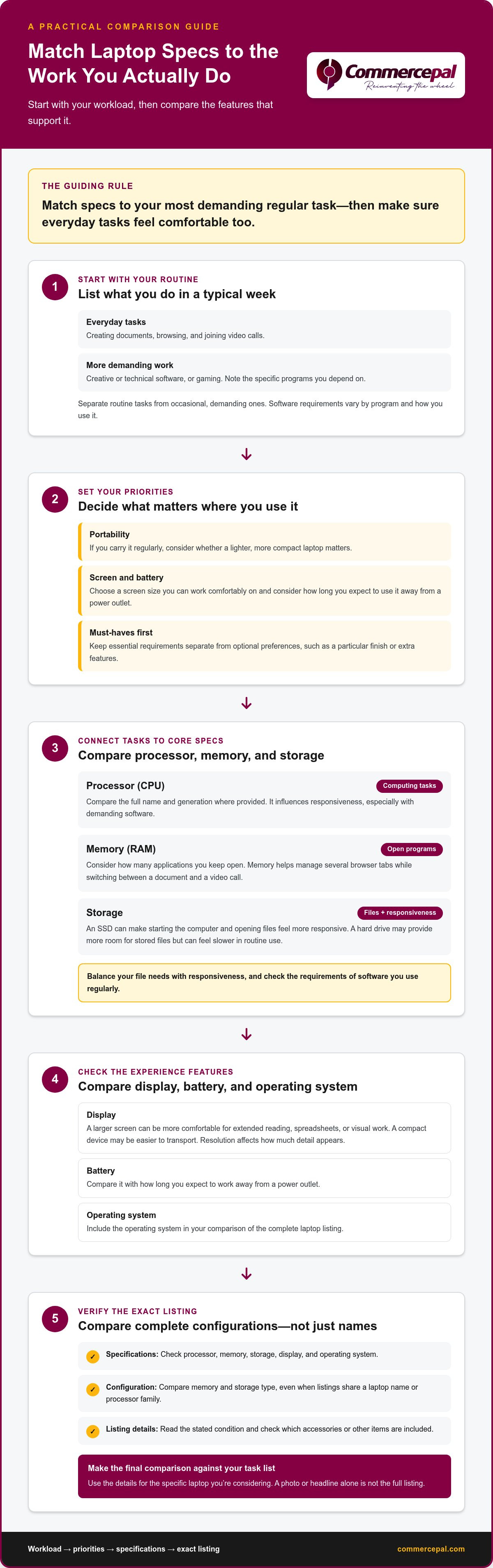
Write down what you expect to do on the laptop during a typical week. Separate routine tasks from occasional, demanding ones. Then consider where you’ll use it: a laptop carried regularly has different priorities from one that mostly stays on a desk. Set essential requirements first, and keep preferences such as a particular finish or extra features on a separate, optional list.
- Daily tasks: Note whether you’ll mainly create documents, browse, attend video calls, or run demanding software.
- Portability: Think about how often you’ll carry the laptop and whether a lighter, more compact device matters.
- Screen and battery: Consider the screen size you can work comfortably on and how long you expect to use the laptop away from a power outlet.
- Must-haves: Identify requirements that affect your work. Keep nice-to-have features from distracting you while comparing options.
For example, if you mostly write, browse, and join calls, prioritize comfortable everyday use over gaming-focused features. If your regular workload includes creative or technical software, note the specific programs you depend on. Their requirements give you a practical basis for comparing laptop specifications.
How do online listings make laptop shopping easier and harder?
Online listings let you explore laptop options from different retailers without visiting multiple shops. Comparing them can take care, though: one listing may put memory and storage in the title, while another places those details lower down. Treat each listing as a set of details to inspect, not just a photo or headline.
- Compare the complete specifications shown, including processor, memory, storage, display, and operating system.
- Read the stated condition and check which accessories or other items are included.
- Compare like with like. Similar product names can refer to different configurations.
Use the details shown for the specific laptop you’re considering, and keep your task list nearby to focus your comparisons. This makes online browsing more manageable and helps you judge each listing against your actual needs.
Which Laptop Specifications Matter for Your Work, Study, or Everyday Use?
Specifications describe how a laptop handles tasks, stores files, displays information, and runs software. They’re useful when you connect them to your routine. A processor name or large storage figure on its own won’t tell you whether a device suits your work. Check the requirements of the software you rely on, especially for creative, technical, or gaming workloads, since needs vary by program and how you use it.
Match the specifications to the most demanding task you perform regularly, then make sure the laptop also handles your everyday tasks comfortably. This keeps comparisons practical, whether you’re reviewing listings for laptops online Ethiopia or narrowing a shortlist. Microsoft’s Understanding Laptop Specifications guide offers more detail on common PC components.
How do processor, memory, and storage affect everyday use?
The processor, or CPU, handles instructions and computing tasks. It influences how responsive a laptop feels, especially with demanding software. Memory, often called RAM, is temporary working space for open programs. For example, memory helps a laptop manage a browser with several tabs while you switch between a document and a video call.
- Processor: Compare the full name and generation where provided, then consider whether it suits your regular applications. Demanding software may need more processing capability than basic document work.
- Memory: Think about how many applications you typically keep open. Multitasking and memory-intensive software make memory capacity more important.
- Storage: An SSD can make everyday tasks, such as starting the computer and opening files, feel more responsive. A hard drive may offer more room for stored files but can feel slower in routine use. Consider both your file needs and responsiveness.
Don’t assume two listings are equivalent because they share a processor family or laptop name. Compare the complete configuration, including memory and storage type, and check the requirements of software you use regularly.
Which display, battery, and operating system features should you compare?
Choose a display that fits how you’ll carry and use the laptop. A larger screen can be more comfortable for extended reading, spreadsheets, or visual work, while a compact device may be easier to transport. Resolution affects how much detail appears on screen. Check the stated resolution and consider whether text and images will be comfortable at your usual viewing distance.
- Battery: Treat stated battery life as an estimate, not a guarantee of your own runtime. Brightness, software, calls, and workload can affect how long a charge lasts.
- Operating system: Confirm which system is installed and whether the software you need supports it.
- Keyboard and ports: Review the keyboard layout and available connections. Check that they suit your typing preferences and any devices you plan to connect.
Before comparing laptops, note the software you use and any system requirements it specifies. Then review each listing’s processor, memory, storage, display, operating system, keyboard, and ports as one complete setup. Explore laptop options on CommercePal with those priorities in mind, and focus on configurations that fit your workload rather than a specification that merely sounds impressive.
How to Compare Laptop Categories Without Paying for Features You Won’t Use
Laptop categories offer a starting point, not a final verdict. Use them to find options that might suit your workload, then compare the actual configuration and stated details. A gaming laptop’s graphics capability can help with demanding games, for example, but its added weight or specialized features may bring little benefit if you mainly write documents and browse.
For shoppers comparing laptops online Ethiopia, value means getting the capabilities that support regular tasks, not simply choosing the most powerful or lowest-priced option. Use the table to narrow your search, then inspect each listing carefully.
Which laptop category fits common workloads?
Think of categories as broad use-case labels. Everyday models focus on routine computing; student and business options often emphasize practical work and portability. Creative and gaming devices target more demanding workloads, but their priorities differ. Match the category to what you actually do, then check that the listed features support those tasks.
| Category | Suitable tasks | Priorities to compare | Likely trade-offs |
|---|---|---|---|
| Everyday | Browsing, documents, streaming, and routine communication | Comfortable display, responsive everyday performance, useful ports | May not suit demanding creative software or intensive gaming |
| Student | Assignments, research, online classes, and video calls | Portability, comfortable typing, battery expectations, camera and microphone details | A compact, easy-to-carry design may mean a smaller screen |
| Business | Documents, communication, spreadsheets, and work applications | Keyboard comfort, ports, operating system, and software compatibility | Features aimed at specialized work may be unnecessary for basic office tasks |
| Creative | Photo, video, design, or other resource-intensive creative work | Display characteristics, processor, memory, storage, and graphics capability | More capability can mean added cost, weight, or shorter battery use |
| Gaming | Computer games and other graphics-intensive applications | Graphics capability, processor, memory, display, and cooling design | May be heavier and more specialized than a general-use laptop |
Categories can overlap. A student editing video, for instance, may need to compare creative-work priorities as well as portability. A business user running specialized software should focus on that program’s requirements rather than assuming every business laptop will suit it.
How can you compare value without relying only on the lowest price?
Compare like with like. Review the complete specification, condition, included accessories, and other details stated on each listing. Similar category labels or product names don’t guarantee matching configurations. A feature is useful when it supports a task you perform; otherwise, it may add complexity without improving your experience.
Make a shortlist around your regular workload, then note which capabilities are essential and which are optional. If affordability is your main comparison, use the best budget laptops in Ethiopia guide for a more focused look. Keep your requirements in view so a compelling feature doesn’t distract from what you need the laptop to do.
How to Review an Online Laptop Listing and Prepare to Order
Before ordering a laptop online, turn your shortlist into a final check. Read the full listing and checkout details together to spot differences between similar configurations and understand what the order includes. If you’re comparing products from various sellers, consider the source as well as the laptop itself. Reviewing seller ratings and platform policies can help you understand how different online storefronts operate.
What details should you verify on a laptop listing?
Check that the listed configuration matches the workload you identified. Don’t rely on a product title alone: similar names may describe different processor, memory, or storage combinations. Compare the images with the written description, check the stated condition and included items, then inspect the order summary and checkout terms before proceeding.
- Set your requirements. Note the tasks the laptop must handle and the specifications that matter for them. Keep optional preferences separate so they don’t distract from essentials.
- Review the exact configuration. Compare the processor, memory, storage, display, and operating system stated in the listing with your requirements. Check the model details, not just the product name.
- Check condition and included items. Read how the listing describes the laptop’s condition. Look for details about accessories or other included items, and compare those details with the images.
- Compare the listing with your shortlist. Make sure you’re comparing the same configuration and condition across options. Note any differences in the details instead of assuming they match.
- Read the checkout summary. Review the selected item, order details, payment instructions, and terms displayed before completing the purchase. Make sure the summary reflects the option you intended to choose.
How does local payment fit into buying laptops online in Ethiopia?
CommercePal supports local payment methods including Telebirr, CBE Birr, and eBirr. At checkout, review the payment options and instructions shown for your order, then make sure they match the method you intend to use.
Follow the displayed steps carefully and review the order summary before submitting payment. Keep any confirmation or transaction details provided during checkout for your records. CommercePal offers free shipping on orders over 5,000 ETB; review the order summary for the shipping details that apply to your purchase.
Use this checklist as you compare laptops online Ethiopia, especially when listings come from different sources or present specifications in different formats. Explore laptops on CommercePal and compare the product details with your requirements.
Shop for Laptops Online in Ethiopia Through CommercePal
A clear buying process keeps a broad search manageable: define your needs, compare specifications, review the exact listing, then follow the checkout instructions shown for your order. Each step helps you move from a general idea of the laptop you want to an informed choice based on its stated details.
CommercePal is an online marketplace for shoppers across Ethiopia. It brings together products from global retailers, including Amazon, AliExpress, and Alibaba, so you can explore international options through one marketplace. Compare the details displayed for each laptop, including its configuration and condition, before deciding which one fits your needs.
What makes a marketplace useful for international laptop shopping?
Product aggregation gives shoppers one place to discover merchandise from global retailers instead of starting a separate search on each source. This can make it easier to browse and compare options, while the listing details remain essential for understanding each laptop’s configuration and condition. Local payment methods connect product discovery with checkout for shoppers in Ethiopia.
CommercePal supports local payment options including Telebirr, CBE Birr, and eBirr. Follow the payment options and instructions displayed during checkout for your order. Free shipping applies to orders over 5,000 ETB, and the order summary shows the shipping details for your purchase.
What should you do before completing your laptop order?
Pause before submitting the order. Recheck that the selected configuration suits your workload and that the product description matches the option you intended to choose. Review the checkout summary, including the displayed order information and payment instructions. CommercePal’s support is available 24/7 if you need help with the shopping process.
- Confirm the fit: Make sure the selected laptop’s specifications support the work, study, or entertainment tasks you expect it to handle.
- Review the listing: Check the stated configuration, condition, included items, and product details for the specific option.
- Read the order summary: Verify the selected item and follow the payment and checkout instructions shown before submitting.
Use this final review to shop for laptops online Ethiopia with a focused plan. Define what you need, compare the details that matter, and use the listing and checkout information to guide your decision. Explore laptop options through CommercePal and discover international choices in one online marketplace.
Make Your Next Laptop Search More Focused
Turn what you’ve learned into a simple decision rule: choose a laptop that meets the demands of your regular workload, feels practical for how you’ll use it, and fits your priorities. Keep your key requirements beside you as you browse, and let them guide which options deserve a closer look.
That approach makes comparing laptops online Ethiopia less about chasing impressive-sounding features and more about finding a suitable fit. Take your time with each listing and base your choice on the details that matter to you.
Ready to put your shortlist together? Explore laptop options on CommercePal and take the next step toward a laptop that works for your everyday needs.
Frequently Asked Questions
Can I buy a laptop online in Ethiopia using local payment methods?
Yes. CommercePal supports local payment methods including Telebirr, CBE Birr, and eBirr. Review the available options at checkout, then confirm that the selected configuration and order summary match what you intended to buy.
Is a laptop with an SSD better for everyday use?
An SSD can make actions such as starting a computer and opening applications feel more responsive than traditional hard-drive storage. The right choice also depends on how much space you need for files and applications. Someone who keeps large media or project files should compare storage capacity closely. Check the listing’s exact storage type and capacity, then weigh both against your needs.
How much memory do I need in a laptop for work or study?
The right amount depends on the programs you use and how many you run at once. A student working with a document and a few browser tabs has different needs from someone using specialized design or technical software. Look up the requirements for your regular applications, then compare them with the laptop’s stated memory. Avoid choosing by a universal rule of thumb alone.
Can I use a laptop bought online in Ethiopia with a different keyboard layout?
Often, you can change the keyboard layout setting in the operating system to type using a different layout, but this won’t change the physical labels printed on the keys. Before ordering, inspect listing photos and descriptions for the keyboard layout. If you regularly touch-type, the difference may matter less; if you rely on visible key labels, make it an important part of your comparison.
What should I check before ordering a laptop online?
Confirm that the processor, memory, storage, display, and operating system suit your intended tasks. Then compare the exact configuration and model details, stated condition, and included accessories. Read the listing description alongside its images, since a product photo alone may not show every included item. Before submitting an order, review the checkout summary and make sure it reflects the laptop and order details you selected.
Is a gaming laptop suitable for school or office work?
Yes, a gaming laptop can handle school or office tasks, but its extra graphics and performance features may not benefit basic document work, browsing, or video calls. Compare its size, display, battery expectations, and configuration with your everyday routine. If you also use demanding software or play games regularly, those capabilities may be more relevant. Otherwise, a less specialized laptop may be a more practical match.


