

The online shopping scams to avoid in Ethiopia include fake stores, misleading listings, fake delivery-fee demands, phishing links, and requests for unusual payments or personal information. Some shoppers receive goods that don’t match the photos or advertised quality; some Telegram sellers take deposits and then block customers. Pause before paying if a seller’s identity, delivery request, or payment instructions seem suspicious.
Online shopping makes it easier to find products, but a convincing page or message doesn’t prove that a seller is genuine. A few practical checks can help you spot warning signs before sharing money or account information.
Learn how to assess a store or app, recognise fake delivery-fee requests, and handle suspicious links and payment demands. This guide also explains what to do if a request feels wrong, helping you make a more informed decision before paying.
Key Takeaways
- Look beyond polished photos: check whether a store or app has clear, consistent details before placing an order.
- Treat unexpected delivery-fee messages as a reason to pause and verify the shipment through a trusted channel.
- Spot phishing clues such as urgent account warnings, unfamiliar links, and unexpected attachments before you tap.
- Recognise risky payment and account-detail requests, including pressure to deposit money through a social-media channel.
1. Fake shopping websites and apps
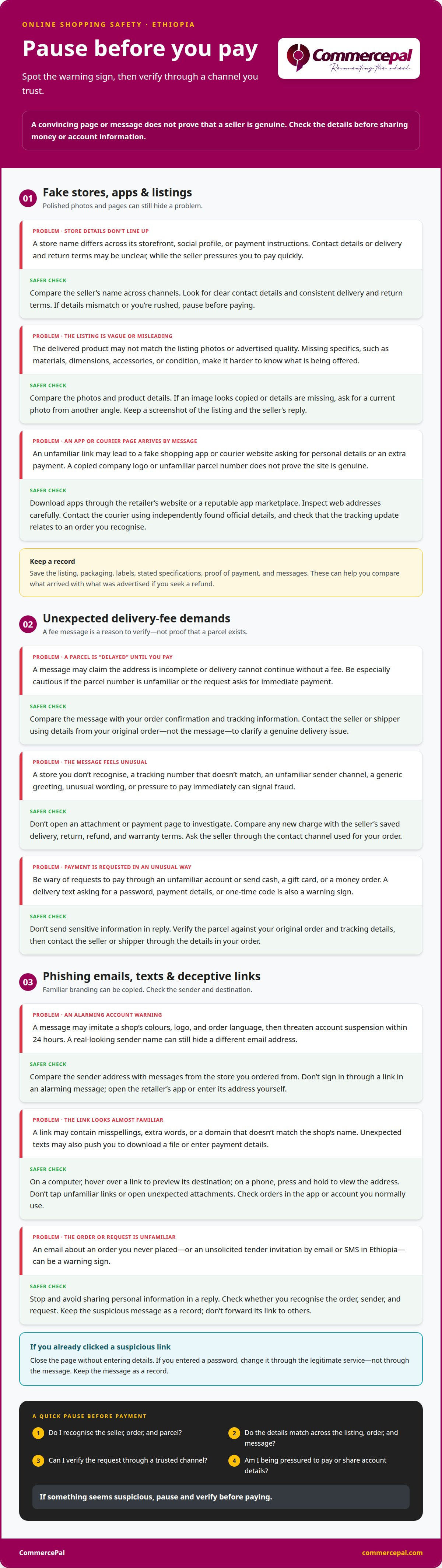
A polished website or app can still hide a fake store. Shoppers in Ethiopia have received products that fell short of the quality shown in listing photos. Before paying, look for a consistent store name, working contact details, clear product descriptions, and delivery and return terms. Compare the seller’s name across its storefront, social media profile, and payment instructions. A mismatch is a reason to pause, especially if the seller pressures you to pay quickly.
Check the product listing closely. Compare photos, materials, dimensions, included accessories, and condition details. If an image looks copied or the description lacks basic specifics, ask for a current photo showing the item from another angle. Keep a screenshot of the listing and the seller’s reply. These records help show what was advertised if the delivered item differs. Download shopping apps only from the retailer’s website or a reputable app marketplace, not through an unfamiliar message link.
Fake courier websites can imitate delivery companies and ask for personal details or an extra payment. Inspect the web address carefully, and don’t enter account information on a page reached through an unexpected message. Find the courier’s official contact details independently and use them to ask about the shipment. A genuine tracking update should relate to an order you recognise. An unfamiliar parcel number or copied company logo doesn’t prove a site is genuine.
To assess an Ethiopian seller, review its public profile, customer feedback, contact details, and consistency across channels. If goods are counterfeit or misrepresented, compare the delivered item with the saved listing, packaging, labels, and stated specifications. Keep the listing, proof of payment, and messages if you seek a refund, as processes can vary by order. Report suspected fraud to an appropriate Ethiopian consumer-protection office or law-enforcement authority, and notify your payment provider. These checks can help you identify online shopping scams to avoid in Ethiopia before sharing money or personal details.
2. Fraudulent delivery-fee requests
A fake package message may say a parcel is delayed, address details are missing, or delivery cannot continue until you pay. Treat an unexpected fee request as a reason to verify, not as proof that a shipment exists. Start with the order confirmation and tracking information from your purchase. If the message names a courier, contact the shipper using details from your original order, not the message. Be extra cautious about a request tied to an unfamiliar parcel.
Look for mismatches before taking action. Does the message name a store you used? Does its tracking number match your order? Does the sender use the courier’s usual communication channel? Generic greetings, unusual wording, and pressure to pay immediately can signal fraud. Don’t open an attachment or payment page just to see where it leads. If a shipping label seems fake, contact the shipper immediately and keep the message as evidence.
Before ordering, read the seller’s delivery, return, refund, and warranty terms together. Check whether delivery charges are included or added later, the conditions for returns, how refunds are handled, and what the warranty covers. Save the terms and order confirmation. Clear written details make it easier to compare a later fee request with the seller’s original terms. If a new charge appears, ask the seller through the contact channel used for your order before paying.
Be wary of messages asking you to pay through an unfamiliar account or send cash, a gift card, or a money order. A genuine delivery update should relate to a parcel you’re expecting and explain the issue clearly. Don’t share a one-time code, account password, or payment details in reply to a delivery text. For an Ethiopian order, compare the request with your original order and tracking details. Contact the seller or shipper using the details in your order to clarify a genuine delivery issue.
3. Recognising phishing emails and deceptive links
A phishing email can copy a shop’s colours, logo, and order language. Look for pressure tactics, such as a warning that your account will be suspended within 24 hours. A real-looking sender name can still hide a different email address. Compare the sender address with messages from the store you ordered from, and treat unexpected account alerts as suspicious. Don’t use a link in an alarming message to sign in.
Inspect a link before opening it. On a computer, hover over it to preview its destination; on a phone, press and hold to view the address. Watch for misspellings, extra words, or a domain that doesn’t match the shop’s name. A link claiming to lead to a familiar retailer, for example, may include a strange extra word. Open the retailer’s app or enter its address yourself instead.
Unexpected texts can also contain malicious links or attachments. A message might claim an order needs confirmation, then prompt you to download a file or enter payment details. Don’t open attachments or tap links from unfamiliar senders. Check the order through the app or account you normally use. An email about an order you never placed is another reason to stop and avoid sharing personal information in a reply.
Unsolicited tender invitations by email or SMS in Ethiopia are a warning sign of possible fraud, even if they mention a familiar institution. For shopping messages, use the same pause-and-verify approach: check whether you recognise the order, sender, and request. If you’ve clicked a suspicious link, close the page without entering details. If you entered a password, change it through the legitimate service, not the message. Keep the suspicious message as a record, and don’t forward its link to others.
Links in unsolicited emails or messages from unfamiliar sources may lead to fraudulent websites or download malware, so avoid clicking them. UPS advises against clicking links or opening attachments in suspicious texts because they may contain a virus.
4. Suspicious payment and account-information requests
Some Telegram shopping channels in Ethiopia take clothing deposits, then disable their channels and block customers. Treat requests to pay a personal account or move to another channel as warning signs. UPS advises against wiring money or sending money orders, gift cards, or cash in response to a payment request. Keep the order message and payment instructions as a record before transferring funds.
Cash on delivery means you don’t pay before a parcel arrives, but it doesn’t prove the seller is genuine or that the goods match the listing. Before accepting, check the seller’s delivery terms, whether you can inspect the parcel first, and the amount due. If inspection isn’t allowed, compare the package details with your order and keep your receipt.
Protect personal and payment information by sharing only what checkout requires. Be cautious if a shopping app asks for access to contacts, text messages, stored passwords, or card information unrelated to the purchase. Avoid online purchases and financial-account access over public Wi-Fi, as the FDIC advises. Don’t give anyone a one-time code, password, or account number in response to an unsolicited message. UPS says it doesn’t request personal or financial information, account numbers, IDs, passwords, or invoice copies through unsolicited communications in exchange for transporting goods or services.
Secure each shopping and payment account with a unique, difficult-to-guess password. The FDIC recommends considering two-factor authentication, which adds a second sign-in step. After paying, review your bank statements for transactions you don’t recognise. The FDIC advises contacting your bank immediately about suspicious activity. If a seller requests new payment details after checkout, stop and review the original order and payment record first. A sudden request to send another deposit through Telegram doesn’t prove that the order needs more money. Keep screenshots, receipts, and messages together in case you need to explain a suspicious transaction to your bank.
CommercePal
When you’re ready to shop for everyday essentials through one business, CommercePal offers smartphones and accessories, laptops and computers, health supplements, and home appliances. Review product details and payment instructions before placing an order. Customers can pay using local Ethiopian methods such as Telebirr, CBE Birr, and eBirr. Use the checks in this guide for any online purchase, including one made through CommercePal: understand what you’re ordering and follow the stated payment process. Explore the available options and choose what suits your needs, then contact CommercePal to discuss your shopping needs.
Make Your Next Purchase With Confidence
Make your next online purchase a deliberate one. Before checkout, pause to match the seller, item, and payment request to the order you intended. Make this a regular part of your buying routine, not an obstacle. Consistent checks can help you make calmer decisions when a message creates urgency.
Use these checks for online shopping scams to avoid in Ethiopia as the starting point for your routine. Decide what information you’ll share, which payment method you expect, and what records you’ll keep. If a request changes after you order, review the original transaction before responding. Small, repeatable checks make future purchases easier to assess.
Shopping for a smartphone, laptop, or health supplement? CommercePal offers these categories for shoppers considering their next purchase. For product enquiries, contact CommercePal. Make your next checkout clear, considered, and on your terms.
Frequently Asked Questions
What are the most common online shopping scams in Ethiopia?
Common scams include fake stores that take payment without sending goods, sellers who deliver items unlike their listings, fake courier messages, and phishing links that steal login details. Telegram clothing channels may collect deposits, then disappear or block buyers. For example, a seller might switch accounts after taking an order. Keep the order conversation and payment receipt so you can identify exactly where the transaction occurred.
What warning signs indicate a fake online shopping website or social media page in Ethiopia?
Watch for a page that changes its name or payment account during your conversation, uses copied product photos, or disables comments while claiming strong customer demand. Be cautious if a seller avoids specific questions about stock or order details. Compare recent posts with older ones: a sudden shift in products, writing style, or contact details can suggest the page has changed hands.
How can buyers avoid mobile money and bank transfer scams when shopping online in Ethiopia?
Before sending money through Telebirr, CBE Birr, eBirr, or a bank transfer, review the recipient name and amount on the confirmation screen. Don’t share your PIN, password, or verification code with a seller. Save the transaction reference and order chat. If you’ve already transferred money and suspect fraud, contact your payment provider promptly and give them the transaction details.


